

One image. Every machine. Every reboot.
CCBoot boots your clients over the network from a single master image. Update once and the room follows on the next restart, and anything a customer left behind is gone.
- 30,000+
- Sites running CCBoot
- 90+
- Countries
- 40%
- Energy saved on thin clients
What it does
Easy updates
Update the master PC once. Every other machine on the LAN picks up the change with a simple reboot.
No more viruses or spyware
The system is restored on every reboot, so the clients are back to a clean state whatever the last customer did.
No more buying hard drives
Client PCs do not need a disk of their own. On a room of any size that is real money left in your pocket.
Less time on maintenance
One person can handle updates, rollouts and repairs that used to take several people most of a day.
Personal disk support
Data that must survive a reboot goes on a personal disk. Useful for labs and offices where files belong to the user, not the machine.
Multiple OS boot
Offer more than one operating system from the same client and let the boot menu decide.
Efficient caching
Physical memory and SSD cache are both used, so a room of clients does not turn the server into the bottleneck.
Restore points
Create a recovery point, merge to last or restore to last. Fixing a bad update is a menu choice rather than a rebuild.
One image for all specs
Plug and play handles mixed hardware, so a single image can serve machines with different motherboards and cards.
Load balance and VLAN
Single servers with multiple NICs, multiple servers, dual LANs and VLAN segments are all supported.
Windows domain
Works with a Windows domain: users sign in with the domain account and keep personal data on the personal disk.
Graphic boot menu
The boot menu can be styled to match the venue instead of showing a plain text list.
How diskless boot works
Client machines have no operating system of their own. They start with a network boot, pull the master image from the CCBoot server and run it in memory with a writeback area for anything that changes during the session.
When the machine restarts, the writeback area is discarded. The image is untouched, so the next customer gets exactly the state you prepared.
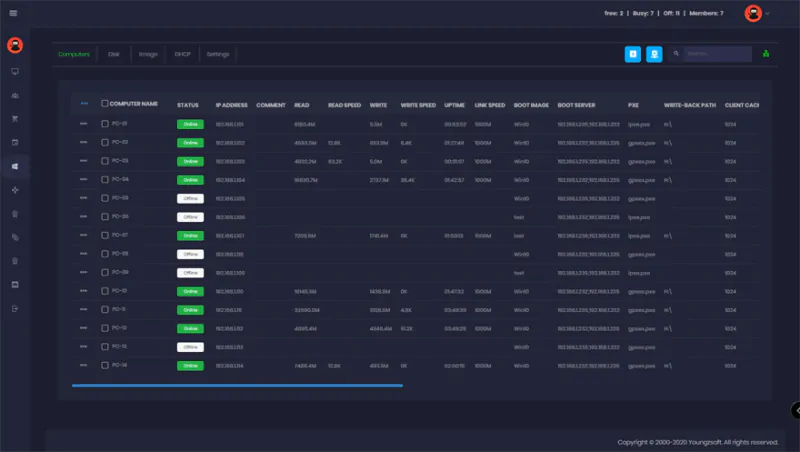
- Boot over PXE or iPXE from the existing LAN
- Writeback in RAM and on SSD, sized to your machines
- Image versioning so you can roll a bad change back
- Works alongside HDD clients during a phased rollout
What the server needs
- Memory
- At least 16 GB of RAM
- Storage
- 4 physical disks, SSD recommended for cache
- Network
- Gigabit NIC; multiple NICs supported for load balance
- Clients
- PXE-capable machines, with or without local disks
- Trial
- 15 days, 10 PCs or more
Watch it in action
Short tutorials from the iCafeCloud YouTube channel.
Common questions
Do the clients still need hard drives?
No. That is the point of diskless boot. You can still keep local disks and run in hybrid mode if you want faster local caching or a phased migration.
Can I run CCBoot without iCafeCloud?
Yes, CCBoot is its own product and is sold separately at ccboot.com. The bundle plan gets you both under one licence.
What happens to customer downloads during a session?
They live in the writeback area and are discarded on reboot. If data has to survive, put it on a personal disk.