

Here's a scenario every cafe operator knows in their bones: Friday night, every seat full, and the hard drive on machine 14 picks that exact moment to give up. One customer loses their progress. Your staff member — who should be running the counter — is now elbow-deep in a PC case, sweating.
CCBoot eliminates that machine. Literally. No local drive, nothing to fail, nothing to reimage. Paired with iCafeCloud's management layer, it's the closest thing to a set-it-and-forget-it infrastructure I've come across in this space. This two-product stack is widely considered the best diskless software for internet cafe operators who are serious about uptime, and after spending real time with both, I think that reputation is mostly earned.
Mostly.
TL;DR — Quick Verdict
Overall Score: 8.6 / 10
CCBoot streams a centralized OS image to every client PC over your local network via PXE booting (a standard protocol that lets machines boot from a server instead of a local drive). No hard drives required on clients. iCafeCloud sits on top and handles everything else — billing, game deployment, member accounts, remote monitoring, all from a browser tab you can open from your couch at 2am.
· Best for: Internet cafes, game centers, school labs, and SME computer rooms that want zero-maintenance client PCs and cloud-backed management.
· Skip if: You run fewer than 5 seats, have no dedicated server hardware, or need Mac/Linux client support.
What Are You Actually Buying Here?
Two products. One team. Built to live together.
CCBoot is the diskless boot engine. Client PCs fire up over the network, pull a master OS image from the server, and run entirely from that. A virus hits one machine? Reboot. Kid installs something sketchy? Reboot, and it's gone. The write-back cache mechanism keeps client writes in RAM or a small local SSD during a session — the master image stays untouched. The moment that session ends, the cache evaporates.
iCafeCloud is the business layer. Member logins, prepaid/postpaid billing, Internet Cafe Management Software features like usage analytics and remote PC control — all reachable from a browser dashboard whether you're on-site or not. That last part matters more than it sounds if you're running multiple locations.
[ASSUMPTION: Feature details are based on publicly available documentation and reference materials provided. Specific version numbers may vary at time of publication.]
They can technically operate independently. In practice, almost nobody does — and you'd be leaving the best parts of both products on the table if you tried.
The Features That Actually Matter in a Diskless Setup
CCBoot: What the Engine Does Well
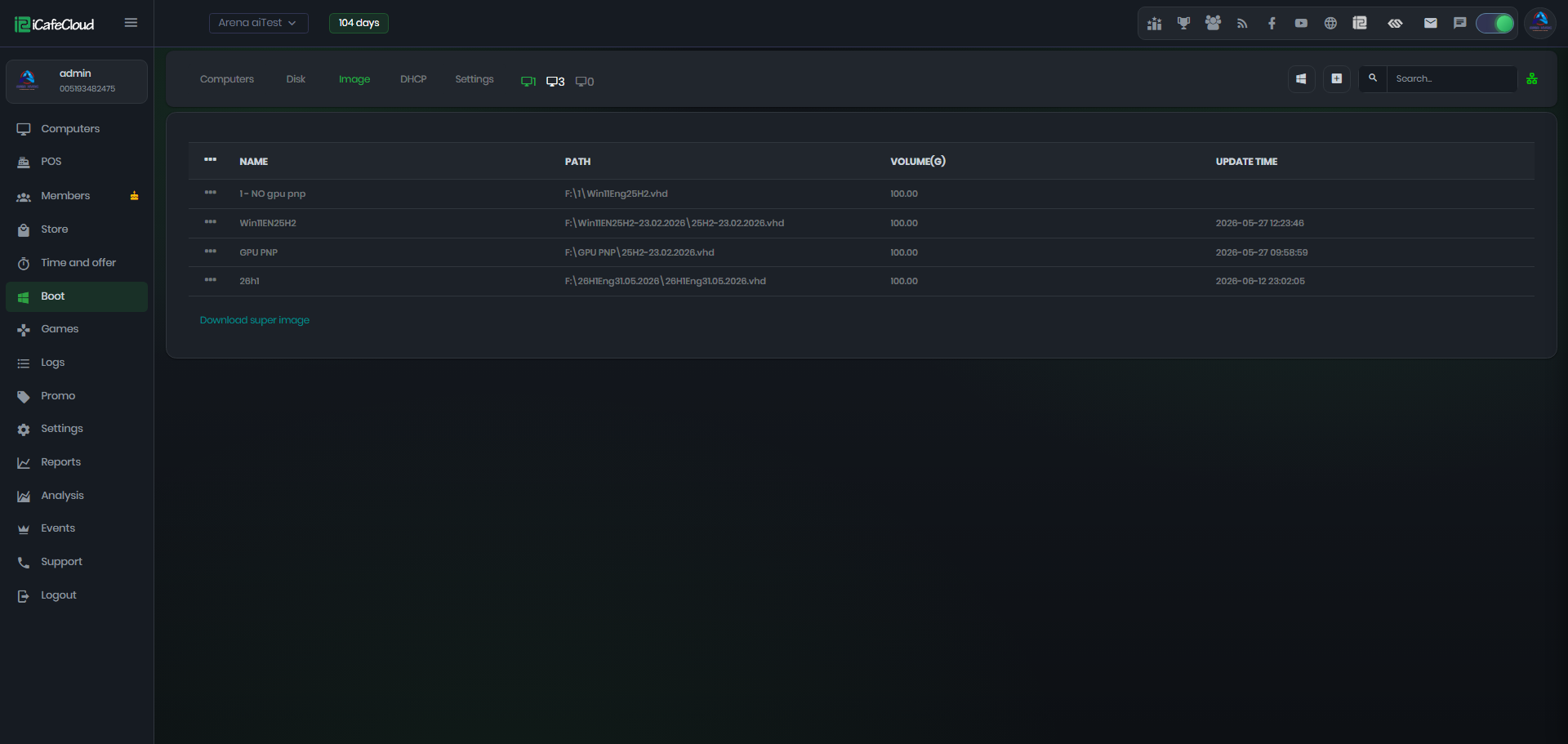
Centralized image management is the whole game here, and CCBoot handles it cleanly. One master image on the server. You patch Windows once, install a game once, fix a driver once — and every client gets it on their next boot without you touching a single machine. For a 30-seat cafe, that's potentially dozens of hours a month handed back to you.
Multi-image support is the feature I'd point educational institutions toward immediately. You can keep completely separate images — a gaming build, an office build, a locked-down student environment — and assign them to specific PC groups. Same hardware, zero reconfiguration. That's where things get interesting.
[PRO TIP: Keep your master image lean. Deploy game-specific files via iCafeCloud's game management module to reduce boot image size and improve network boot times.]
One thing worth understanding before you commit: CCBoot's architecture means your entire operation depends on server uptime. If that server goes down mid-session, every client PC freezes. This isn't a flaw, exactly — it's an inherent tradeoff of diskless architecture — but it means a UPS and basic redundancy planning aren't optional. They're mandatory. Full stop.
iCafeCloud: The Management Layer
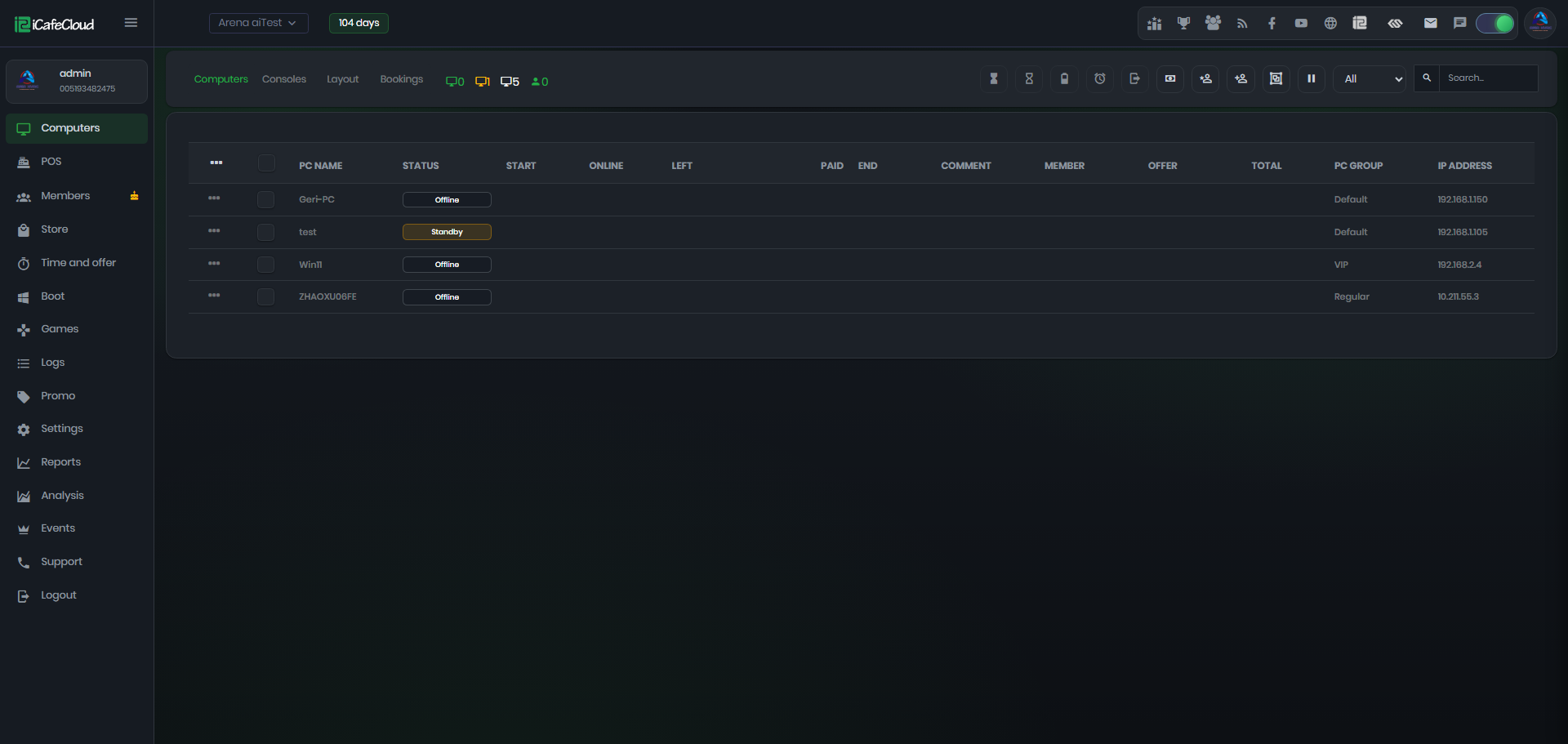
The cloud dashboard is the kind of useful that actually changes how you run your business. You can check active sessions, machine status, and revenue from your phone while standing in a grocery store checkout line. For multi-location operators, this is the whole value proposition.
Billing flexibility is deep. Prepaid cards, postpaid time billing, combo packages, loyalty tiers, multiple currencies. The game and software deployment workflow is where iCafeCloud genuinely outpaces most standalone Internet Cafe Management Software tools: bulk deployment across all seats, version control, scheduled updates during off-peak hours. You set it up once at midnight, and your customers at 10am have no idea anything changed. This is fast. Like, genuinely fast, once you've got the workflow down.
[EDITOR'S NOTE: iCafeCloud's remote reboot and screen-capture monitoring tools are particularly useful for educational institutions and government agencies that need compliance oversight.]
Member management is solid without being spectacular — visit history, spending patterns, top-up balances, promotional discount hours. Right-sized for a cafe operator. Not so complex it needs a dedicated admin, not so thin it's useless.
What Does This Stack Actually Cost?
[ ASSUMPTION: Pricing tiers below are based on reference documentation provided. Confirm current pricing at the vendor's official website before purchasing.]
CCBoot licenses per server, not per seat. One license, unlimited client PCs booting from that server. Compared to per-seat models some competitors use, this is a meaningful structural advantage as you scale — your 50th seat costs nothing more than your 10th.
iCafeCloud runs on a subscription model scaled by managed seats, with a free tier for small deployments that's genuinely useful for validation before you commit real money.
The honest math for a 20-seat operation: between eliminating client hard drives, cutting IT labor hours, and reducing unplanned downtime, the combined annual cost of both products is likely recovered within the first quarter. Take that with a grain of salt if your situation is unusual — but that's not vendor marketing. That's what happens when you remove the most common failure point in a cafe environment.
Who Is This Stack Actually Built For?
Internet cafes and game centers with 10 to 200-plus seats are the obvious core audience. But educational institutions are an equally strong fit — the compliance and consistency requirements of a school lab map almost perfectly onto what CCBoot's multi-image architecture delivers. Government agencies and SME computer rooms fall into the same bucket.
Running a solo operation with four seats? This stack is overkill. It is overkill. The server infrastructure investment — dedicated hardware, gigabit LAN, proper DHCP and PXE configuration — only pencils out at a certain scale. And if you don't have at least basic networking knowledge, or access to someone who does, the initial setup will be a rough experience. Mac or Linux clients? CCBoot doesn't help you there. Windows, full stop.
How Does It Compare to Traditional Setups?
Traditional setups — local hard drives, per-machine software like Antamedia or Smartlaunch — work fine. Antamedia in particular has solid billing features. But every client PC is its own independent failure point, and no amount of software elegance fixes a dead hard drive. That's just physics.
CCBoot changes the maintenance equation at a structural level. Operators report 70–80% reductions in client PC maintenance time after switching to diskless — consistent with vendor case studies and, frankly, with the basic logic of removing the component that breaks most often. iCafeCloud's management depth, particularly the game deployment workflow, surpasses most standalone Internet Cafe Management Software platforms I've looked at.
The Honest Pros and Cons
✅ Pros | ❌ Cons |
Eliminates client HDD failures entirely | Initial server setup has a real learning curve |
One-click OS/game updates across all seats | Requires reliable gigabit LAN infrastructure |
Cloud dashboard accessible from anywhere | Advanced features locked behind paid tiers |
Strong multi-image support for mixed environments | No native Mac/Linux client support |
Active community and vendor documentation | Network outage = every client goes dark |
Should You Actually Deploy the Best Diskless Software for Internet Cafe Operations?
Yes — with conditions.
If you're running 10 or more seats and still managing individual hard drives, you're leaving time and money on the table. The CCBoot + iCafeCloud stack is the most thorough, purpose-built answer to the best diskless software for internet cafe question I've found. Clean machines on every reboot. Centralized game management. Cloud billing you can check from anywhere. Near-zero client hardware failure.
The setup investment is real — capable server hardware, a solid gigabit network, someone who knows what DHCP and PXE mean. Think of it like a commercial kitchen range versus a home stove: the installation is more involved, the infrastructure requirements are real, and it's overkill for someone cooking twice a week. But if you're running a restaurant? The performance gap justifies the complexity before long.
This is enterprise-grade infrastructure that small and mid-size operators can actually afford and run. If your environment fits the profile — and you know if it does — it's one of the smarter technology bets you can make for your business.
Final Score: 8.6 / 10
Questions People Actually Ask About This
Can I run CCBoot without iCafeCloud?
Technically yes — CCBoot works as a standalone diskless boot server. But you'd be giving up billing, member management, and remote monitoring, which means solving those problems some other way. The vast majority of commercial operators use both. There's a reason for that.
What does the server actually need to look like?
At minimum: dedicated hardware, multi-core processor, 16–32 GB RAM, fast SSD or NVMe storage for boot images, gigabit NIC. If you're pushing 50-plus seats, think seriously about a 10GbE server NIC and managed switches. Skimping on the server is the most common setup mistake operators make — and the consequences show up fast.
Does iCafeCloud actually work for schools?
It does, and in some ways better than for cafes. Multi-image support means different locked-down environments for different classes or user groups. The remote monitoring and screen-capture tools give administrators the compliance oversight that school and government deployments typically require.
Is there a free version?
Both products have trial or limited free tiers. CCBoot has historically offered a free license for small deployments with a limited number of client connections. iCafeCloud provides a trial period for new accounts. Check the official vendor site — terms change, and I'd rather you verify than trust a review article for pricing specifics.
What happens if the server crashes mid-session?
Active sessions freeze or disconnect. Client PCs depend entirely on the server for their OS — that's the fundamental tradeoff of diskless architecture. A UPS and redundancy planning aren't optional in a production environment. Budget for both before you go live. Not after.