

Let me be direct about something before we get into the weeds: the internet cafe management software market in Europe is not broken because of bad features. It's broken because of bad architecture. That distinction is what makes this review worth your time.
Legacy desktop-based cyber cafe management software was built for a world that no longer exists — one server, one location, one language, one operator standing in the room. European net cafe operators today are dealing with GDPR obligations, multilingual staff, customers who move between cities and expect their account to follow them, and an increasingly distributed business model. The software most of them are still running was not designed for any of that. Not even close.
iCafeCloud has positioned itself as the answer to this specific problem. Whether it actually delivers is what we're going to sort out here.
Where iCafeCloud Sits in the European Net Cafe Market
The competitive field here is older than most people realize. Antamedia Internet Cafe, HandyCafe, Smartlaunch — these tools have held ground for years, and honestly, they've earned some of that loyalty. Operators don't migrate away from working systems just because something shinier showed up.
iCafeCloud isn't competing on feature depth, at least not primarily. It's competing on deployment model. Fully cloud-based, no local server dependency, no manual patch cycles, no single point of hardware failure that takes your whole operation down on a Saturday night when you have a full house. For a European operator running locations in, say, Germany and Poland simultaneously, that architectural decision changes the entire conversation before you've clicked a single button in the interface.
That's the pitch. Now let's see where it holds up and where it gets complicated.
What Does iCafeCloud Actually Do Differently?
Traditional cyber cafe management software gives you control over the machines in the room you're standing in.
iCafeCloud gives you a real-time dashboard accessible from any browser, on any device, from anywhere. Active sessions, revenue, machine status — across all your locations at once, without being physically present at any of them.
If you run a single 20-seat netcafe with no plans to expand, that might sound like overkill. But if you're a multi-site operator — or planning to become one — this is the feature that rewires how you think about running the business. A member registered at your Warsaw location walks into your Berlin location and their prepaid balance, account history, and preferences are already there. No staff intervention. No awkward "let me look that up" moment at the counter. It just works.
Most legacy internet cafe management software simply cannot do this. Not because nobody thought of it — because the architecture doesn't support it.
The Features — An Honest, Asymmetric Look
Multi-Language Interface and European Localization
I'm going to spend more time here than on anything else, because this is where iCafeCloud makes its most compelling case and where I've seen the most competitors quietly fall short.
"Multi-language support" in SaaS products almost always means the marketing site is translated. Sometimes it means the onboarding emails. What it almost never means — until you're already paying and training your first hire in Bucharest — is that the actual operational interface your staff uses every day is in their language. That's where things get interesting, and not always in a good way.
iCafeCloud's localization applies to the dashboard itself. Staff in Spain, Romania, and Sweden can use the same net cafe management software in their native language without workarounds or third-party translation plugins bolted on afterward. Regional currency display and date/time formats are handled too. That last part sounds trivial until you're explaining to a new hire in Prague why the billing timestamps are in a format nobody in the office recognizes. In my experience, these "small" friction points accumulate fast.
For operators in Central and Eastern Europe especially — where you might have staff speaking three different primary languages across two locations — this cuts training friction in ways that actually show up in your error rates.
Billing, Session Control, and Prepaid Management

The billing engine supports time-based pricing, prepaid packages, and member top-ups. Operators can configure different pricing tiers — off-peak rates, weekend packages, student discounts — and have them apply automatically without staff touching anything. Pretty clean, honestly.
Session control is tight. Remote lock, unlock, or terminate any machine session from the cloud dashboard. This matters for underage access compliance, which varies across European countries but is universally something operators have to think about.
Remote Management and Cloud Infrastructure
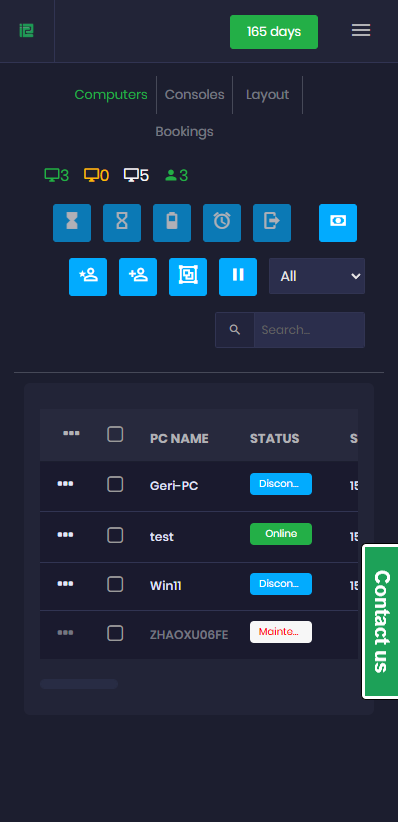
No on-site server means lower capital expenditure and no ongoing IT maintenance for server hardware. Software updates deploy centrally — every location in your network is always running the same version, simultaneously, without anyone at each site doing anything. And for a solo operator managing a 30-seat cafe without dedicated IT staff, the hardware monitoring alerts alone — flagging underperforming terminals before they become customer-facing problems — are a meaningful reason to pay attention to this platform.
How Does iCafeCloud Compare to Legacy Internet Cafe Management Software?
Here's the honest version of this comparison.
Antamedia and Smartlaunch have thorough feature sets built over years of real-world development. The gap between them and iCafeCloud is not primarily about what the software can do — it's about what happens when something goes wrong, and what happens when you need to grow.
Legacy tools require a local server. That server fails, your operation stops. Full stop. iCafeCloud's operational data and billing logic live off-site, which means a hardware failure at one location doesn't cascade into a business-stopping event. Legacy cyber cafe management software also requires manual updates, which means different locations in your network can drift onto different software versions — a consistency and support headache that gets worse the more locations you add.
Where legacy tools sometimes win: depth of customization for bespoke hardware configurations. Operators with highly specific peripheral integrations may find that older desktop software offers more granular control than a cloud platform designed for standardized setups. I'm honestly not sure if this is a dealbreaker for most European operators or just an edge case — but it's worth auditing your hardware situation before you commit to a migration. Take that with a grain of salt depending on your setup.
But for the majority of net cafe operators running standard configurations, the trade-off favors iCafeCloud.
Pricing — What to Actually Expect
Subscription model. Predictable monthly costs instead of large upfront license fees. This matters more than it sounds — especially for operators opening new locations or testing a new market where you don't want a five-figure software commitment sitting on the books before you've proven the location works.
Per-location or per-seat pricing structures are common in this category, and iCafeCloud follows a similar approach. The total cost of ownership for cloud-based internet cafe management software typically runs lower than legacy on-premise alternatives once you factor in server hardware, IT maintenance, and the labor cost of keeping multiple locations manually updated. European operators should run that math explicitly before assuming legacy is cheaper. Your mileage may vary depending on how many locations you're managing, but the numbers tend to shift in the cloud's favor pretty quickly.
Who Should Actually Choose iCafeCloud?
Three profiles. Not two, not five — three.
Multi-location operators who need centralized oversight across sites in different countries. This is the use case the platform was clearly built around, and it shows in every architectural decision. Every single one.
Operators opening new locations who want to avoid the capital expense of on-site server infrastructure. The cloud model lowers the barrier to expansion in ways that compound over time.
Operators in linguistically diverse markets — particularly Central and Eastern Europe — where staff across locations may speak different primary languages. The multi-language interface is a genuine operational advantage here, not a marketing bullet point.
(A quick note for the single-location netcafe owner who's been running the same setup for six years without a problem: you're not the target. The migration effort from a working legacy system probably isn't justified right now. But if expansion is anywhere in your thinking, read this review again in that context.)
The Verdict
iCafeCloud is not the deepest feature set in the market. That's not a knock — it's a deliberate trade-off, and for most European net cafe operators, it's the right one.
What it is: the most operationally coherent choice for operators who think about their business at scale, across borders, without wanting to manage server rooms or babysit update cycles. The cloud-first architecture, genuine multi-language localization, and cross-location account portability solve real problems that legacy internet cafe management software handles badly or not at all. This is fast. Like, genuinely fast to deploy compared to the on-premise alternative.
If multi-site management or regional expansion is any part of your near-term plan, iCafeCloud warrants serious consideration. That's not a hedge — that's a recommendation.
Frequently Asked Questions
Does iCafeCloud only make sense for multi-site operators, or does it work for a single cafe too?
Single-location operators get real benefits here too — remote monitoring, automatic updates, no local server to babysit. The cloud infrastructure advantages don't require multiple locations to matter. That said, the platform is arguably most powerful once you're running two or more sites.
What's the GDPR situation with a cloud-based platform like this?
Cloud platforms serving European customers are generally required to address GDPR obligations. Before you deploy, ask iCafeCloud specifically for data residency and processing documentation — don't assume compliance, get it in writing.
If a customer tops up their balance at one location, can they spend it at another?
Yes. Centralized account management means member balances and profiles are accessible across all locations in your network. This is one of the clearest differentiators versus legacy software — worth testing during your trial if you want to see it in practice rather than take my word for it.
Which languages does the operator dashboard actually support?
Multiple languages suited to European markets — but confirm the specific list directly with iCafeCloud, since supported languages expand with platform updates and the current list may be broader than what's documented publicly. From what I can tell, coverage for Central and Eastern European languages is a deliberate focus.
How do software updates work across multiple locations?
Centrally deployed through the cloud infrastructure. All locations update simultaneously, automatically. Nobody at each site has to do anything. That's the whole point.