

Tournament nights that run themselves
Create an event in the control panel, let players join from iCafeMenu, and let the match stats do the scoring. Wins, kills and assists arrive on their own — nobody keeps score on paper.
What it does
Local events
Your own tournament: one game, your dates, your ticket price, and the number of top players who take the prize.
Global events
Events we host across every venue running iCafeCloud. Your members join from the client and compete with players from other centers.
Custom events
For a title the tracker does not cover, create a Custom event and enter wins, kills, assists and deaths yourself.
Automatic scoring
Overwolf collects the match stats on the client PC, and iCafeCloud turns them into points and coins with the formula for that game.
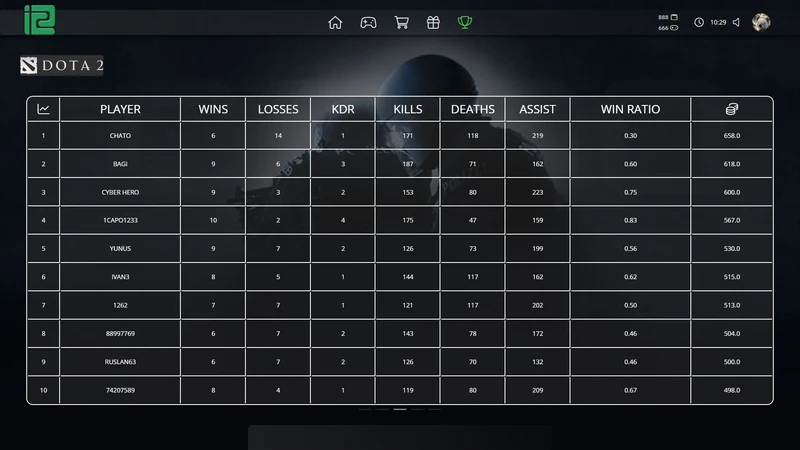
Leaderboards
A local ranking for your venue and a global ranking across centers, both visible to players inside iCafeMenu.
Coins that spend
Points come with game coins, and coins buy real items from the Gifts tab of your shop.
Run an event in four steps
Everything lives on the Events page of the control panel — there is no separate tournament tool to learn. An event can be a single night or run for a month; the scoring works the same either way.
Only a player's five best games count, so one lucky first match does not decide the table. Every time someone beats their own record, the weaker game drops out.
- Open Events in iCafeCloud and click Add
- Set the name, the game, the mode — solo, duo or squad — the start and end time, the number of top winners, the ticket price and the scoring type
- Players open the Events tab in iCafeMenu and join; anyone new can register from that screen
- Points and positions update while they play, and the winners are listed by their five best games
How points are counted
The scoring is not a black box. Every value comes from the match itself, and you decide what each one is worth.
- 01
Stats from the match
Wins, kills, assists, deaths, last hits and matches played are read from the game by Overwolf on the client PC.
- 02
Best five games
Each player is ranked on their five strongest games during the event, not on how many matches they managed to squeeze in.
- 03
A formula you control
Settings → Game Settings → Game Coin Settings holds the win and kill values for every game. Edit them and the coins follow.
- 04
Nothing is taken away
A bad match simply earns nothing — there is no coin deduction for losing. Stats upload when the match ends, or at logout if the player skips quitting.
Games tracked automatically
- Fortnite
- League of Legends
- Dota 2
- Valorant
- Counter-Strike: Global Offensive
- PUBG
Anything outside this list still works as a Custom event: you enter each player's results in the admin panel and the system applies the same coin formula.
Before you start
- License
- An active iCafeCloud license. Events are created by the admin of the center.
- Client
- iCafeMenu installed on the client PCs — players join and follow the tables there.
- Tracker
- Overwolf, which is downloaded together with iCafeMenu and has to be running; look for its icon in the system tray.
- One game at a time
- Only the first game launched on a PC is tracked. To switch, restart Overwolf or reboot the machine.
- Where to create
- The Events page in the control panel, Add button.
- Ticket and prizes
- An optional entry price per event, and the number of top players who count as winners.
Watch it in action
Short tutorials from the iCafeCloud YouTube channel.


Common questions
What do I need besides iCafeCloud?
iCafeMenu on the client PCs, with Overwolf running on them. Overwolf is downloaded together with iCafeMenu, so in most venues there is nothing extra to install.
Which games are scored automatically?
Fortnite, League of Legends, Dota 2, Valorant, Counter-Strike: Global Offensive and PUBG. For any other title, create a Custom event and enter the results by hand.
How are the points worked out?
From the match stats — wins, kills, assists, deaths and last hits — using the coin formula for that game. The win and kill values can be edited per game in Settings → Game Settings → Game Coin Settings.
Can a player lose coins by losing a match?
No. A lost match earns nothing, and it never removes coins that were already won.
Can I charge an entry fee?
Yes. Every event has a ticket price, which you can leave at zero, and you decide how many of the top players count as winners.
What is a global event?
A tournament we run for every center on iCafeCloud. Your members join it from the Events tab in iCafeMenu and appear in a leaderboard shared across venues.