

PC Booking System for Internet Cafes
A regular who cannot get their usual seat on a Friday night is a regular you are about to lose. Booking lets them claim it in advance from their phone, and holds the machine so it is genuinely free when they walk in.
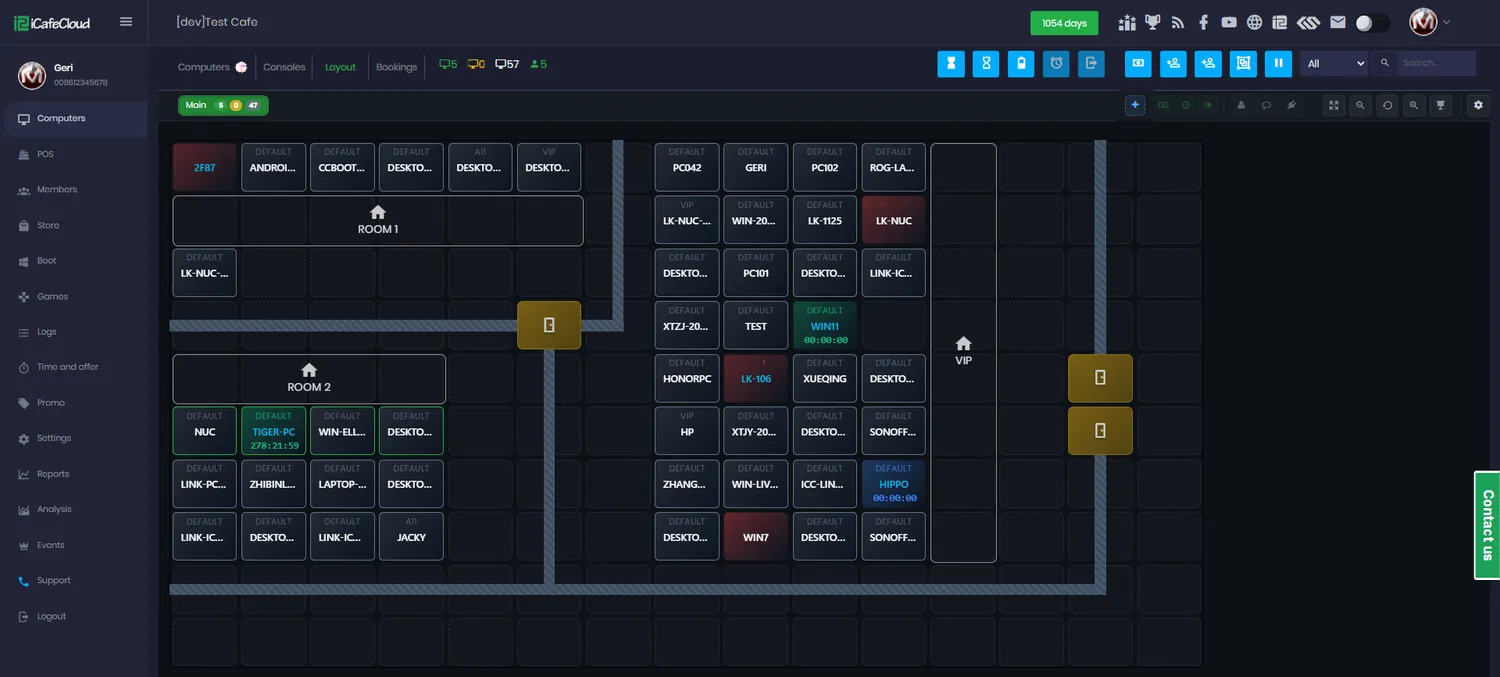
What booking covers
Book at the counter
Cashiers reserve PCs and consoles for members or guests straight from the Bookings tab on the Computers page.
Book from the portal
Members pick a date, a time and a machine from the member portal on their own phone, with no staff involved at all.
The seat is actually held
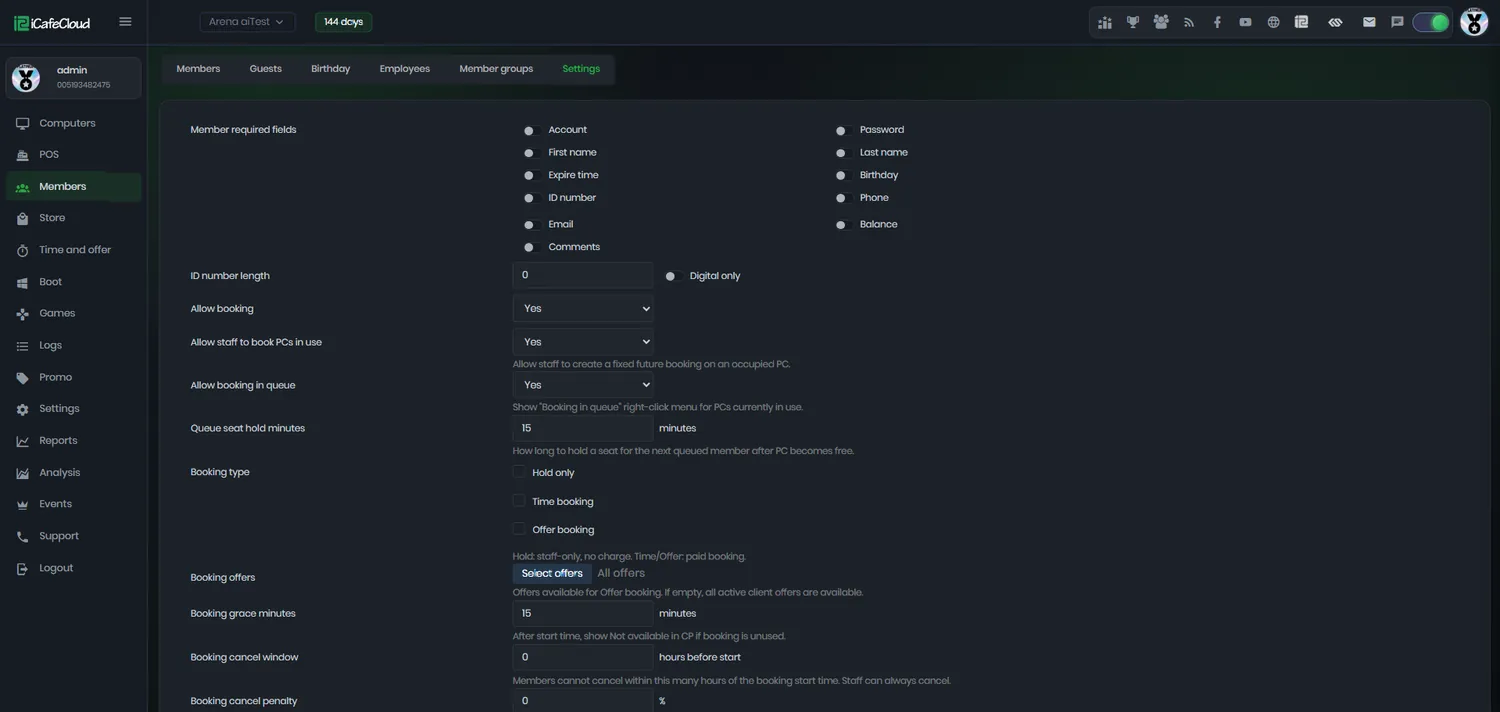
Booking lock minutes stops anyone else starting a session on that PC in the minutes before a reservation begins.
Queue a busy machine
Allow booking in queue lets a member reserve a PC that is currently in use, so they are next in line instead of hovering behind someone.
Rooms, not just seats
Mark rooms in your layout as bookable, reserve the whole thing for a group, and check them all out as one bill with Pay by room.
Rules you set
Minimum notice, minimum duration and one booking per PC per day — all configurable, and all applied to portal bookings automatically.
Charged for what they use
A booked member starts their session as scheduled and pays for the actual duration, not for the block they reserved.
Cancellations and no-shows
Cancel individually or in bulk from the admin panel when somebody does not turn up, and find cancelled reservations in the report export.
Every reservation on one timeline
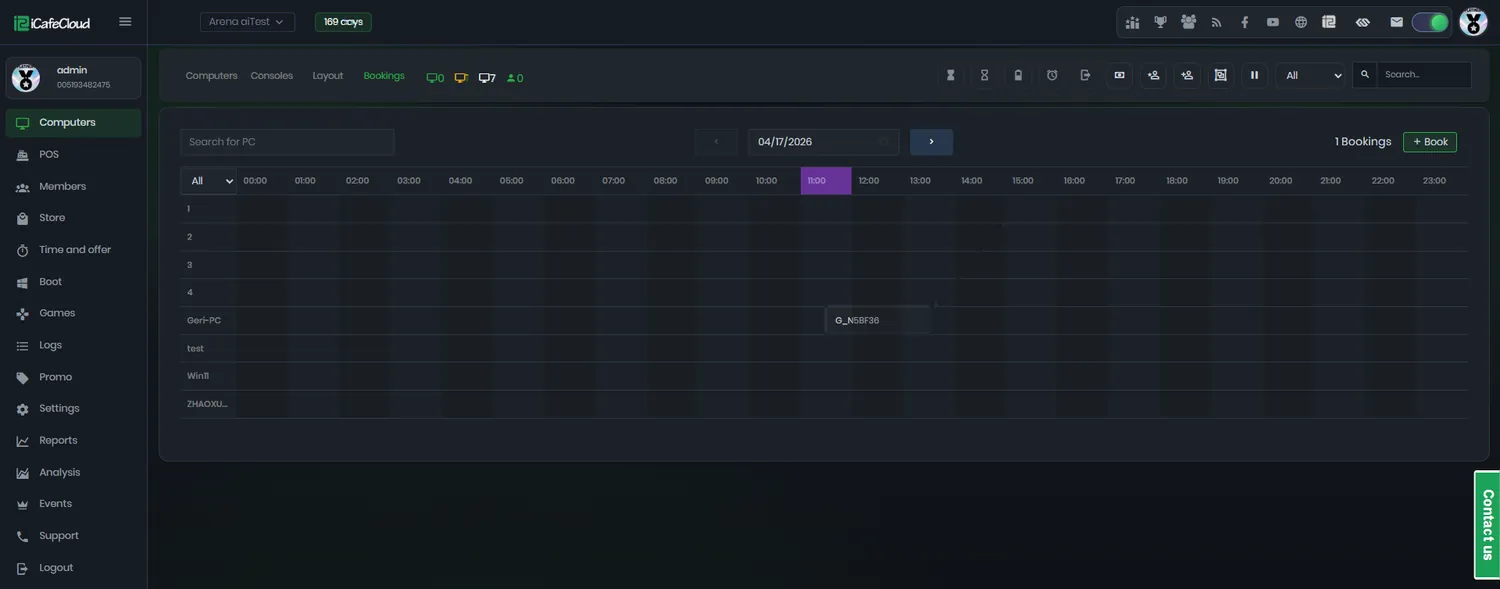
The Bookings tab shows the day as a grid of machines against hours. A cashier can see at a glance what is committed tonight and what is still sellable.
Bookings are made here for members and for guests, edited by clicking them, and cancelled individually or in bulk when a group does not show up.
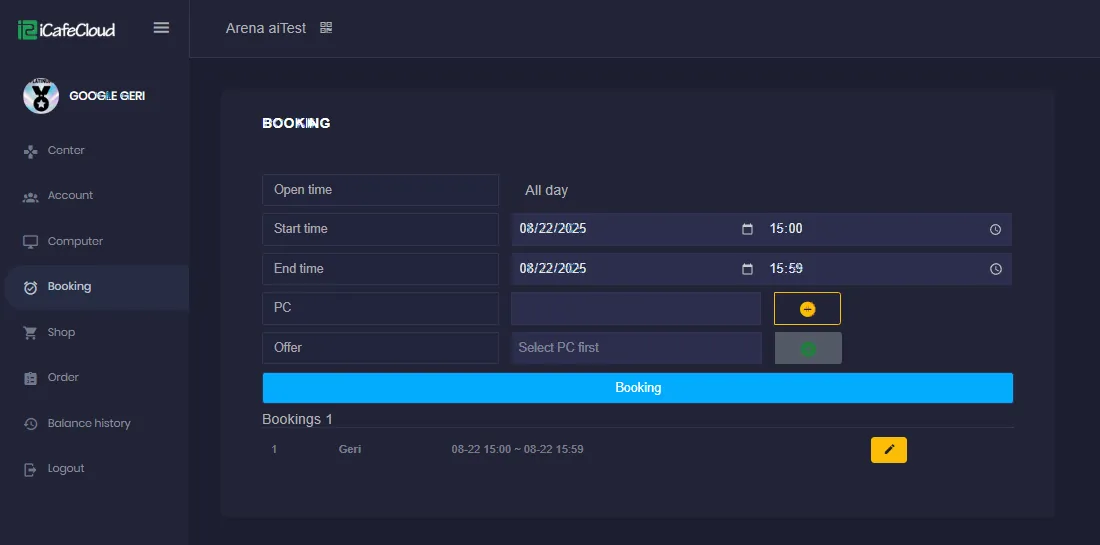
Booked from a phone, before they leave home
On the member portal a customer picks an open time, a start and end, the PC they want and optionally an offer to go with it. If the machine is already taken they are told immediately rather than after travelling across town.
This is the part that pays for itself. A booking made on a Thursday afternoon is a seat you have already sold for Friday night, without anyone at your counter taking a phone call.
Rules that stop booking being abused
Free online booking with no constraints is an invitation to block out your best machines and never arrive. Every one of these limits applies to portal bookings; counter bookings by staff are unaffected.
Set them once in Member settings and the portal enforces them without anyone having to say no to a customer in person.
- Minimum hours of notice before a booking
- Minimum booking duration
- One booking per PC per day
- Lock minutes before the start time
- Booking in queue for machines already in use
All of it in one settings page
Booking is switched on per centre and configured in one place: whether members may book, what they must supply, how far ahead, for how long, and what happens to a PC in the minutes before a reservation starts.
Rooms are defined in the layout and marked bookable or not, so a tournament room can be reservable while the walk-in row stays first come, first served.
How a booking runs
- 01
The member reserves
From the portal on their phone, or at the counter if they would rather just ask somebody.
- 02
The rules are checked
Minimum notice, minimum duration and the one-per-day limit are applied before the booking is accepted.
- 03
The PC is locked
For the lock minutes before the start time, nobody else can begin a session on that machine.
- 04
They sit down
The session starts as scheduled and is billed for the time actually used, not the block reserved.
Documentation
Booking setup, limits and day-to-day handling in the wiki.
Common questions
Can customers book without coming in?
Yes. From the member portal in a browser or the iCafeCloud app they pick the date, time and machine themselves, and the booking appears on your calendar straight away.
What stops someone else taking a booked PC?
Booking lock minutes. For the number of minutes you set before the reservation starts, no new session can begin on that machine, so the seat is free when the customer arrives.
Can a PC that is already in use be booked?
With Allow booking in queue, yes. The member reserves the machine while the current session is still running and takes it when that session ends.
Can I book a whole room?
Yes. Rooms are defined in the layout and can be marked bookable. Pay by room then starts and checks out every PC in the room as a single transaction, which is how you handle a group or a party.
How do I stop people booking out the whole day?
Minimum booking duration, minimum hours before booking and PC booking once per day all constrain what a portal booking can do. Bookings your staff make at the counter are not affected by those limits.
What happens with a no-show?
The reservation stays on the calendar until you cancel it, individually or in bulk, and cancelled reservations appear in the report export so you can see who does it repeatedly.
The rest of the platform
- BillingPrepaid, postpaid, member and offer sessions, priced by PC group, member tier and hour of the day.
- Game LibraryOne catalogue across every PC: Steam, Epic, Riot, Uplay, VKPlay, Windows Store and your own local titles.
- Game UpdatePatches land on the server image, not on your customers. Update once, serve every machine.
- License SharingA pool of centre-owned accounts that lends a licence to whoever is playing, then takes it back.
- ReportingIncome, top-ups, offers, products, games and members — by day, by shift, side by side.
- MembershipAccounts, groups, balances, bonuses and a self-service portal your regulars actually use.
- PromotionPromo codes, top-up rewards, points, bonus rules and a lucky spin — all running by themselves.
Sell Friday night on Thursday afternoon
Start a free trial, turn on portal booking, and let your regulars claim their own seats.