

There is no single best internet cafe management software, and any list that names one without asking about your floor is guessing. There is a best kind, though. For a venue opening or re-equipping in 2026, it's a cloud-managed platform, licensed per station, with a shared pool for game licenses and a portal that customers use on their own phones. That's my answer, and I'd rather give it to you in the first paragraph than the last.
You shouldn't take it on trust. What follows is the method: five kinds of software, eight criteria, 100 points. Score your own shortlist with it, then see how iCafeCloud does on the same card.
Why every "top 10" list has a different winner
Search for this and you'll get a dozen ranked lists. Open four of them. The product in the first place is different every time.
Part of the reason is that the lists mix categories. A session timer built for the six public PCs in a library gets ranked against a platform built for an 80-station esports arena, as if the same buyer were choosing between them. Part of it is the scoring. One product gets 8.7 and the next gets 8.4, and nowhere does anyone say what was measured or how much each thing counted.
And none of them ask who you are. A 15-station shop where the owner works the counter and a three-branch operation with a general manager read the same list of "pros" and are expected to reach the same conclusion.
A ranking is only useful when you know what was scored and for whom. So sort first. Score second.
Three things to settle before you compare anything
Start with the floor. A 15-station neighborhood shop, a 40-station gaming center and an operator with several branches are three different customers, and most of the disagreement between those top-10 lists disappears once you know which one you are. Write the number of stations at the top of a sheet of paper. Add consoles if you have them.
Then ask who stands at the counter. If it's you, every day, you can live with software that expects its operator to know things. If it's a part-timer on their second week (which in the US, where labor is the biggest line after rent, it usually is), the software has to run the shift and leave the human to handle exceptions.
Last, where does the money come from? Seat time is the obvious one, and US walk-in rates commonly land between $5 and $12 an hour. But look at the rest. Memberships and top-ups. Paid game titles. The drinks fridge. Room bookings for parties and teams. Circle the biggest. That's the criterion that deserves the most weight when you get to the scorecard, and it's rarely the same for two venues on the same street.
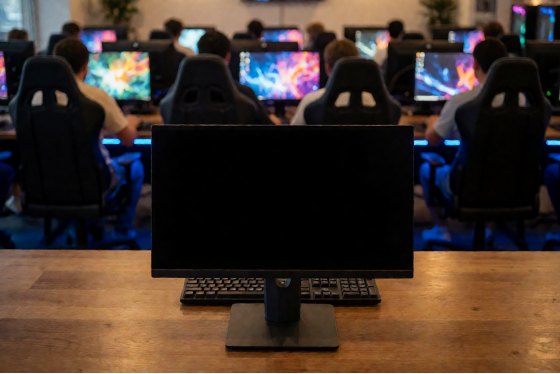
The front counter of a gaming center with rows of stations behind it
The five kinds of internet cafe software
If you're hunting for the best internet cafe management software, it helps to know that nearly everything on those lists falls into one of five groups. None of them is wrong. Each fits a certain floor.
Desktop timers. This is the oldest kind: a small server program on the counter PC, a client on each station, a clock and a lock screen. It suits a handful of machines in a place where selling computer time is a side business, such as a hotel lobby or a print shop with four PCs along one wall.
Locally hosted suites. Same architecture, much more inside it: member accounts, a point of sale, printing charges, price plans. Everything, including the data, lives on a machine in your back office. This kind fits a venue with someone technical on staff who wants the whole system on the premises and is happy to look after it.
Cloud-managed platforms. A server component still sits in the venue and talks to the stations, but the admin panel lives in a browser. The owner checks the floor from home. New features arrive without anyone installing anything. Customers get a portal on their phones for top-ups and bookings. For most venues opening now, and for any owner who isn't physically in the building seven days a week, this is the group to shop in. iCafeCloud belongs here.
Esports venue platforms take the cloud model and add a competitive layer on top: rewards tied to in-game results, points, events. They fit a floor whose regulars come for ranked play and want something to show for it. The line between this group and the previous one is thin, and iCafeCloud crosses it with Coin Prizes, where players earn coins for how they perform in games and spend them on prizes you define.
Diskless plus billing is the fifth. Here the stations have no local drives. Windows and the games load from a server, one image is updated once, and every PC has the new version after a restart. Put billing on top and you have a floor where patch day is a non-event. This is where larger venues tend to end up, and it's why iCafeCloud is sold as a bundle with CCBoot as well as by itself.
Two questions will tell you which group any product belongs to, whatever its marketing page says. Where do I open the admin panel when I'm not in the building? And where does a game live: on each PC, or once on a server? The answers place the product in about thirty seconds, which is a lot faster than reading a feature grid with ninety green ticks in it (every grid has ninety green ticks).
The scorecard: eight criteria, 100 points
Here is the card. The weights are a sensible default for a gaming-led venue of 30 to 50 stations.
Criterion | Points | What full marks looks like |
Billing and session | 20 | Prepaid and postpaid sessions, member |
Members and self-service | 15 | Accounts with balance and history, |
Games: library, licenses, | 15 | One catalogue across launchers, a |
PC and console control | 10 | Every station on one screen. Start or end |
Booking | 10 | Reserve one station or a whole room |
Promotions and retention | 10 | Promo codes and top-up rewards that |
Reports | 10 | Income by product and by game. Filters |
Support and trial | 10 | A trial on your own floor before you pay. |
Three rules for using it.
Score each line as zero, half or full. Don't spend ten minutes deciding between a 7 and an 8, because the difference won't survive contact with a real Saturday.
Change the weights, but keep the total at 100. Take the revenue source you circled earlier, raise its criterion to 25, and pay for that out of whichever line matters least to you. A venue with no party room can halve Booking. A venue that lives on memberships can't.
Split the scoring between two people. Let whoever works the counter score billing and station control, since they're the one who'll be using those screens at 9 pm on a Friday. You score reports and support. Buyers and users see different products, and the gap between your two sets of numbers is often the most useful thing the exercise produces.
Scorecard for internet cafe software with eight criteria adding up to 100 points
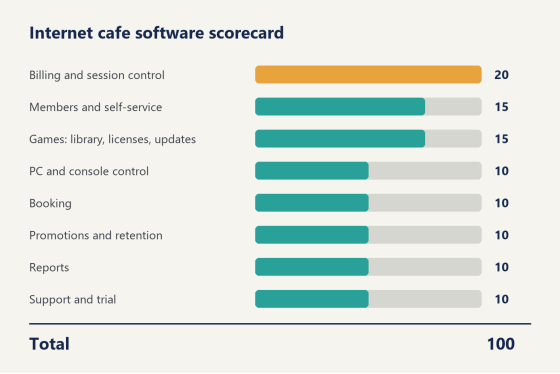
Here's how the arithmetic goes for a made-up candidate on a 38-station floor. Full marks on billing is 20. Half marks on members, because accounts exist but top-ups only happen at the counter, is 7.5. Games gets the full 15, station control the full 10, booking a zero because there isn't any, promotions 5, reports 10, support 5. That's 72.5. A second candidate that scores half on billing but full on everything else comes out at 90, and yet for a venue that earns most of its money from seat time I'd still look hard at the first one, which is exactly why the weights are yours to change before you start.
Notice what the card leaves out. The look of the interface isn't on it. Neither is the number of features, the age of the company or the logos on the homepage. Those things are easy to compare and they're what most ranked lists end up comparing, but none of them tells you which is the best internet cafe management software for a full room on a Friday night.
How iCafeCloud scores
Line by line, with facts only. You do the adding.
Billing and session control. iCafeCloud bills five ways. Prepaid and postpaid cover walk-ins, member sessions draw on a balance, offers sell a fixed package of time, and free-time sessions round it out. The clock starts when the customer sits down, the rate for that machine and that member tier is applied, and the charge is written when the session ends. When time runs out the PC locks.
Members and self-service. Accounts carry a balance and any bonus on top, track points and hours, and keep the history. Member groups set the prices. A self-service portal handles top-ups from the customer's phone, so the counter doesn't have to.
Games. One catalogue covers the big launchers (Steam, Epic, Riot, Uplay) alongside Windows Store apps and your own local titles. Paid games run from a license pool: the venue owns a set of accounts, the system lends one for the session and takes it back afterwards. Updates land on the server and go out from there. When you score this line for any product, don't stop at "is there a pool?" Ask how you'd size it for 40 stations. A vendor who has done this before will start from the peak number of people playing that title at once, not from the seat count.
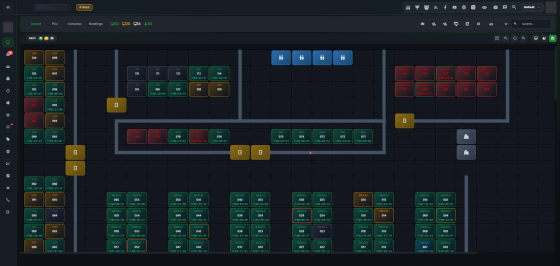
PC and console control is easiest to judge by looking. The screenshot below is the Layout view: a map of the floor with every station in its place, its group label on the tile, and a running timer on each one that's in use. Consoles and Bookings sit in tabs next to it. Sessions can be started and ended from here, machines restarted, access cut off.
The iCafeCloud Layout view showing a floor map of stations with group labels and session timers
Booking. Members reserve a single station or a whole room from the portal, consoles included. The machine is locked before they arrive, and they pay for the time they use.
Promotions and retention. Promo codes and top-up rewards, cashback and points: all of it is rule-based, set once and then applied at the counter and on the customer's own screen. Discounts can trigger on how much a customer has topped up or how many hours they've logged. Coin Prizes adds the competitive side.
Reports cover income and top-ups, offers and products, games and members, plus spend per PC. They filter by date, staff, member group or shift, compare against last month and export.
Support and trial. Support is staffed 24/7. The trial runs on ten or more of your own PCs for 15 days and can be extended to 30. Behind that are 3000+ venues in more than 90 countries.
That's eight lines. I've left the total blank on purpose, because a vendor's score for its own product is worth exactly what you'd expect. Check any line you doubt against the full feature list, or click through the panel yourself in the live demo.
Which is the best internet cafe management software for you?
It depends on which of the three floors you wrote at the top of your sheet.
For the 15-station neighborhood shop, shop in the cloud-managed group and weight billing and self-service top-ups above everything else. Your scarce resource is your own time at the counter. Every top-up a customer does on their phone is a minute you get back.
For the 40-station gaming center, it's the same group, with the games line and the booking line scored hard. This is the size where paid titles start to cost real money if you buy one per PC, and where party and team bookings begin to fill the weekday gaps. Honestly, this is also the floor the default weights were written for, so use them as they are.
For 80 stations and up, or for more than one branch, add the diskless layer. At that size the weekly cost of keeping every machine patched is larger than the cost of the software, and one image on a server is the only approach that scales with the floor.
In all three cases the answer comes from the same family, and it's the family iCafeCloud was built in.
Run the scorecard on a real weekend
A scorecard filled in from a website is a first draft. The real one gets filled in after two days of use, because the best internet cafe management software on paper and the one your counter staff can run without you are sometimes two different products.
Put the trial on one row. Apply for a trial license, let your counter staff run Friday and Saturday on it, and score the eight lines again on Sunday night with them in the room. Costs are per PC, with monthly and annual plans listed on the pricing page. If a line on your card needs a detail this article doesn't cover, such as what to run the server component on for your seat count, ask the live chat team and they'll give you the current recommendation.
So, the best internet cafe management software for a floor opening this year: cloud-managed, with a license pool and a customer portal, plus a trial you can run before you commit. Score it yourself. I think you'll land in the same place.