

In the highly competitive world of esports and LAN centers, offering top-tier hardware is no longer enough to guarantee success. Today’s gamers crave a cohesive, immersive experience that begins the moment they walk through your doors and continues seamlessly onto the screens in front of them.
For operators, this means prioritizing comprehensive gaming cafe design—where your physical environment and your digital client interface speak the exact same brand language.
If your cafe boasts a stunning interior but relies on a clunky, generic Windows desktop for players to launch games, you are breaking the immersive spell. This guide will walk you through customizing your digital client interface while perfectly aligning it with your physical infrastructure, ensuring an unforgettable brand experience that keeps players coming back.
Throughout the guide, we’ll reference iCafeCloud—a platform widely used by gaming cafe operators to manage clients, sessions, billing, and the on-PC user experience (iCafeMenu). For UI customization specifics, use the official iCafeCloud wiki as your source of truth: Customize Client UI.
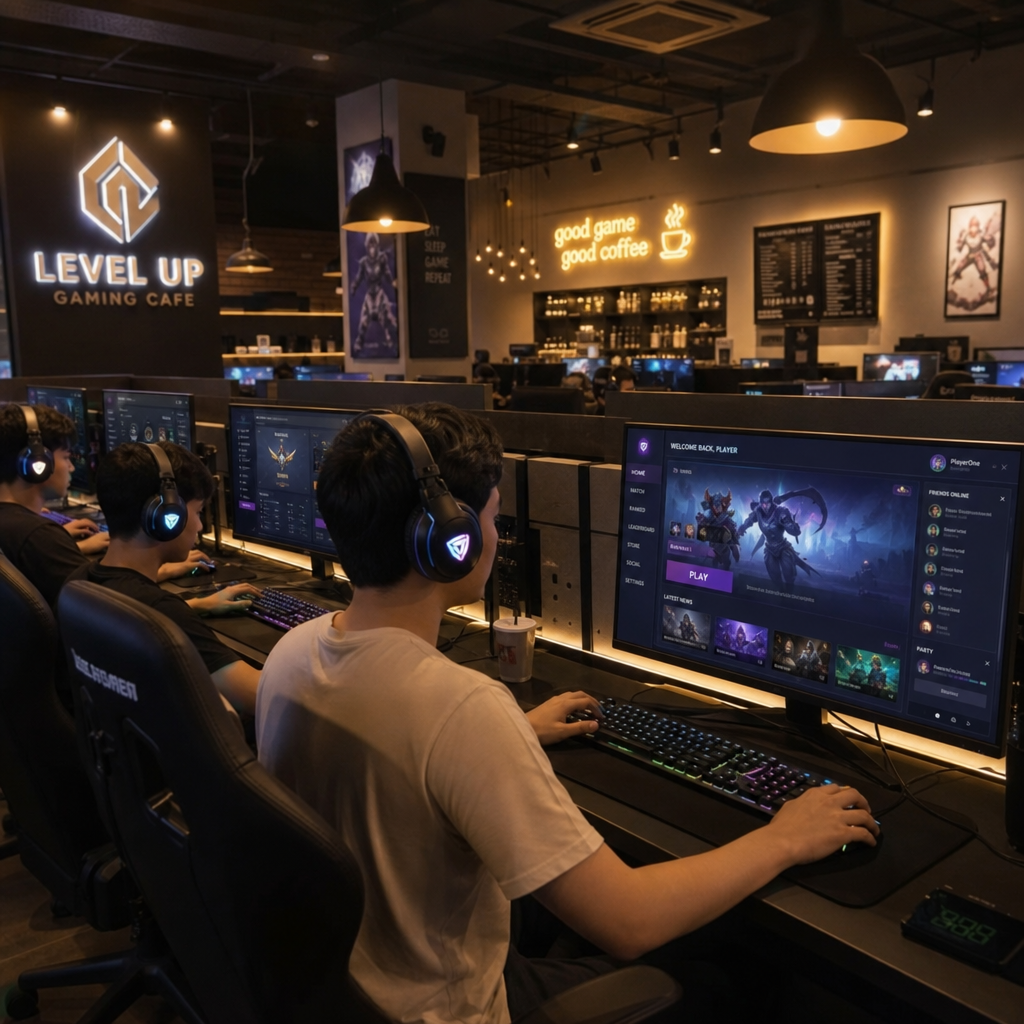
The Heart of the Digital Experience: Perfecting Your Client Interface
When a customer sits down, the digital launcher is their primary touchpoint with your brand. A seamless, custom gaming cafe interface eliminates friction, allowing users to order snacks, find their favorite games, and manage their playtime without ever leaving their seat.
Leveraging iCafeCloud and iCafeMenu
Modern operators rely on robust management software to keep things running smoothly. Platforms like iCafeCloud offer powerful tools for operators, but the true magic for the user happens within the iCafeMenu client interface.
To maximize your branding:
- Match Your Brand Colors: If your physical cafe uses neon pinks and electric blues, your iCafeMenu theme should reflect this. Consistency builds brand recognition.
- Custom Banners and Logos: Replace generic software logos with your own. Use the interface banner space to promote upcoming weekend tournaments, membership discounts, or in-house food specials.
- Organized Game Categories: Group games logically (e.g., FPS, MOBA, Co-op). A clean, intuitive custom gaming cafe interface prevents user frustration and gets them into the game faster.
Step-by-step: Customizing the Client UI (operator workflow)
If you want your custom gaming cafe interface to look consistent across every station, treat customization like a deployment process—not a one-off design task. The exact labels and navigation can change by version, so follow the iCafeCloud wiki steps closely here.
- 1) Prepare brand assets: Create a logo (light/dark variants), a background or hero image, and any UI icons in web-friendly formats. Export at multiple sizes so the UI remains sharp on different monitor resolutions.
- 2) Back up before you change: Save your current UI/theme settings (or document screenshots) so you can quickly roll back if a new layout causes readability issues on the client PCs.
- 3) Apply your theme and visuals in the admin console: In the iCafeCloud management interface, locate the client UI customization area described in the wiki, then upload/assign your logo, backgrounds, and theme colors.
- 4) Configure the user-facing modules: Enable and arrange the items your customers actually use (games list, account/time info, offers, ordering). Keep the first screen minimal: “Play,” “Browse,” and “Order” typically cover most intent.
- 5) Validate on real client PCs: Test on at least two stations with different monitor sizes. Confirm legibility (fonts, contrast), click targets, and load performance. This is where “gaming cafe design” and UI design intersect—if the room lighting is dark, UI contrast matters even more.
- 6) Roll out consistently: Deploy the same UI profile across all machines (and zones, if you run different station tiers). Re-check after client updates to ensure assets and colors remain intact.
- 7) Iterate with intent: Add seasonal banners and event promos, but avoid UI clutter. Rotate promotions and keep your core navigation stable so regulars build muscle memory.
Bridging the Digital and Physical: Masterful Gaming Cafe Design
Your gorgeous digital interface needs to be housed in an equally impressive physical space. Understanding how to plan internet cafe floor space is the first crucial step. The goal is to maximize your PC count for revenue while maintaining premium comfort.
Floor Space and Workstation Layout
When mapping out your floor plan, you must balance density with comfort. An ergonomic workstation layout for esports centers is vital. Players sit for hours, and if they feel cramped, they won't return.
- Determine PC Spacing: The optimal spacing between computer stations is generally 31 to 35 inches of desk width per player. This gives them enough room for low-DPI mouse swipes without elbowing their neighbor.
- Zoning the Floor: Consider the dynamic between private gaming booths vs open communal areas. Open areas are fantastic for groups of friends playing casual games, while soundproof private booths command a premium hourly rate from competitive squads who need to communicate without distractions.
- Tournament Readiness: If you plan to host local esports events, utilize modular desk configurations for tournament setups. Desks that can be quickly unlocked and rearranged into a 5v5 stage layout will make your venue the go-to spot for local organizers.
Infrastructure: The Invisible Backbone of Your Brand
A custom gaming setup looks great on the outside, but if the internet drops or the room feels like a sauna, your brand reputation will tank. Your digital interface will only run as smoothly as the infrastructure supporting it.
Power and Cooling Requirements
Never guess when it comes to electricity. You must execute precise power load calculations for high-end PC setups. A modern gaming rig with a top-tier GPU and monitor can draw anywhere from 500W to 800W under heavy load. Multiply this by 50 or 100 PCs, and you are dealing with massive electrical demands that require dedicated circuits and commercial-grade breaker panels.
With great power comes great heat. Standard commercial air conditioning will fail in a packed LAN center. You must invest in industrial HVAC requirements for high-density computer rooms. Work with an HVAC specialist to calculate the exact BTUs generated by your machines and human occupants to ensure a continuous flow of crisp, cool air.
Connectivity and Cable Management
Lag is the ultimate enemy of the gamer. Guaranteeing a seamless experience on your custom gaming cafe interface requires a high-speed fiber optic infrastructure for low latency. Ensure you have enterprise-grade routers and a failover secondary ISP line so your cafe never goes completely offline.
To keep your physical space looking as clean as your digital UI, you need integrated cable management systems for multiple rigs. Use under-desk cable trays, zip ties, and raised flooring to hide power and ethernet cables. A wire-free aesthetic instantly elevates the perceived quality of your brand.
Designing the Vibe: Aesthetics and Acoustics
Once the layout and infrastructure are rock solid, it is time to focus on the sensory experience. Your cafe's aesthetic should be a physical extension of your digital branding.
Lighting for Immersion
A highly popular and effective design choice is a futuristic cyberpunk aesthetic for immersive environments. To achieve this, avoid harsh overhead fluorescent lights. Instead, implement ambient lighting strategies for immersive play. Use addressable RGB LED strips behind monitors, under desks, and along the baseboards. When your iCafeMenu launcher features a dark mode with neon green accents, matching the room's physical lighting to that exact shade of green creates an incredibly immersive, branded environment.
Sound Control
Gaming cafes are inherently loud, with constant callouts, mechanical keyboards, and cheering. To prevent the space from becoming an overwhelming echo chamber, install acoustic wall panels for noise reduction in lounges and heavy-traffic areas. Not only do these panels absorb sound, but they also come in modern geometric shapes that can enhance your interior design.
Strategic Zoning for Alternate Revenue Streams
A profitable gaming cafe operators knows that PC time is just one piece of the puzzle. How you design your non-gaming zones directly impacts your bottom line. These areas should be integrated seamlessly into your overall floor plan.
The First Impression: Front Desk and Retail
Your front desk is the control center. Secure front desk and membership counter planning is essential for staff safety, cash management, and theft prevention. Make sure the desk has clear sightlines across the entire gaming floor.
Adjacent to the check-in area, consider retail zone integration for hardware sales. When a customer uses a high-end mechanical keyboard or a premium headset at their station, they might want to buy one for their home setup. Displaying branded merchandise, energy drinks, and gaming peripherals in beautifully lit glass cases near the entrance capitalizes on impulse buys.
Food, Beverage, and Chill Zones
Gamers need fuel. A well-designed food and beverage area keeps players in your building longer. Pay close attention to snack bar and lounge area seating arrangements.
- Keep it separate but visible: The lounge should be a distinct zone where players can eat without risking spills on expensive keyboards, but it should still overlook the main gaming floor so they feel connected to the action.
- Comfort is king: Provide plush sofas, high-top tables with bar stools, and plenty of charging ports for mobile phones.
- Digital Ordering: Tie this back to your software. Allow players to order food directly from their custom gaming cafe interface. When the food is ready, the system can send a discrete pop-up notification to their screen, merging digital convenience with physical hospitality.
Conclusion: The Ultimate Cohesive Experience
Building a successful esports center requires a delicate balance of high-tech software and meticulous physical planning. By customizing your digital touchpoints through platforms like iCafeCloud and ensuring your iCafeMenu mirrors your brand, you create a professional, premium feel.
However, that digital excellence must be supported by top-tier gaming cafe design. From mapping out the optimal spacing between computer stations to executing complex power load calculations, every detail matters. When you combine high-speed infrastructure, comfortable ergonomic layouts, and a beautifully customized client interface, you create more than just an internet cafe—you create a gaming destination.