

It's 1 pm on a Saturday at a 34-station LAN center in Denver. Five people are lined up at the counter, and all five want the same thing: to put ten or twenty dollars on an account. A birthday party of twelve has just come through the door behind two parents carrying pizza boxes. The person at the register started nine days ago.
Every vendor's page for LAN center software lists the same features in a slightly different order. Billing, memberships, game launcher, reports. None of those lists tells you what happens at that counter in the next ten minutes. Questions do, so here are the seven I'd bring to any demo, with what a good answer sounds like.
1. Can a customer pay without coming to the counter?
Start here, because the answer decides how many people you need on shift.
Walk-in rates in the US mostly sit between $3 and $8 an hour, depending on the day and the hardware. One US center lists $6 an hour for non-members, $4 for members and a $35 day pass. North of the border, a Toronto centre advertises CAD 6.49 an hour, and a Vancouver one charges CAD 7.99 for the first hour and CAD 5.99 after that. These are small transactions. If each one needs a staff member, a card reader and forty seconds of small talk, the counter becomes the slowest thing in the building, and on Saturday the line for it reaches the door.
A North American LAN center on a Saturday afternoon with PC stations and a console corner
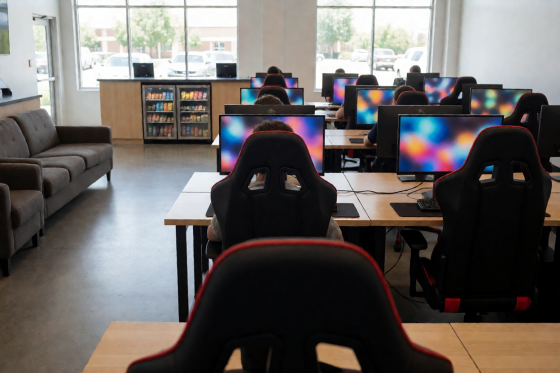
Good LAN center software gives the customer more than one way to pay without a human: on the phone, at the station and by the front door.
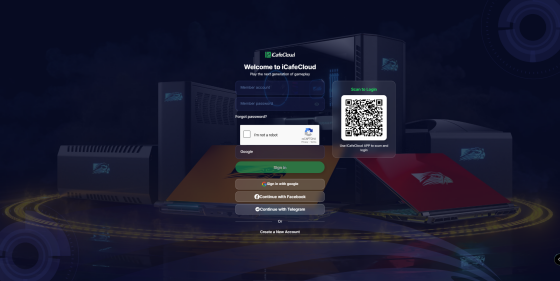
On the phone, members sign in to a portal that belongs to your center. In iCafeCloud that portal takes a member account and password, or a Google, Facebook or Telegram sign-in, and the top-up happens right there. You can generate a QR code that opens the portal and print it. Tape one where the line forms. People who are standing still with a phone in their hand will use it.
The iCafeCloud member portal sign-in page with account, social and QR login options
At the station, the login screen has a Balance button. The member enters their account, chooses whether to top up by time or by amount, picks a preset or types a number, and a QR code appears on the screen. They pay through Stripe on their phone. When the payment completes, the top-up is on the account and they log in. On your side the setup is a Stripe account and an API key, entered under Settings in the QR and SMS section with Stripe selected as the payment gateway.
At the front door, a kiosk. This is a screen running the kiosk page in a full-screen browser, and it does three jobs: members top up, new customers register, and anyone can open the Layout view to see which PCs are free before they pay for anything.
One setting is worth a minute of thought. The Stripe top-up has a minimum amount, and where you put it matters. Set it at about twice your walk-in hour (so $12 if you charge $6). Nobody then pays for a single hour and reappears at the top-up screen fifty-five minutes later, and most people end up with a balance that brings them back next week.
Promo codes work in the portal and in the QR top-up too, and each member can use a given code once.
2. What happens when a walk-in doesn't want an account?
Not everyone is a regular. On a weekend a good share of the floor is people who will come once: a dad with an hour to fill, a cousin visiting from out of town, the friend who got dragged along.
The wrong answer is a registration form at the counter with an email field and a password rule. The right answer is "they pay and they play."
iCafeCloud handles this with a guest login at the station. The walk-in scans a QR code and pays, and a guest account is created automatically for that session. No form. If that guest turns up again the following Saturday, staff can convert them to a member from the admin panel, and from then on they get member pricing and a balance of their own.
A small sign at each station does the selling for you: "Members pay $4." A guest who has just paid $6 reads it for an hour.
The day pass belongs in this conversation too. A lot of North American centers sell one, and it's the easiest product to get wrong by hand, because somebody has to remember when each pass started. Ask how the software sells a fixed block of time. In iCafeCloud that's an offer: a set number of hours at a set price that the customer buys once, with the station locking when the block is used up. A $35 day pass and a three-hour after-school bundle are the same kind of object with different numbers in them.
3. Can a party book the whole room from a phone?
Two kinds of groups fill the hours a LAN center can't fill with walk-ins. Birthday parties take weekend afternoons. School esports teams take weekday afternoons, because high school esports is a sanctioned activity in much of the US now, teams practice a few hours every week, and plenty of schools don't have a lab of their own.
Both groups book ahead, and both judge you on one thing: whether the stations are ready when they arrive.
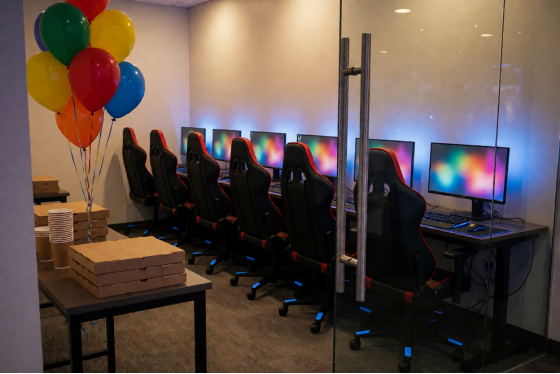
So LAN center software has to keep bookings in the same system that sells the seats, not in a shared calendar or a notebook by the phone. With iCafeCloud, members reserve a single station or a whole room from the portal on their phone, consoles included. The machine is locked before they arrive, and they pay for the time they use. For a party, staff usually create the booking at the counter instead: pick the member or mark it as a guest, set the date with a start and end time, then select every PC in the room in one go. The first station opens with the member's login and the others open with a password that's stored in the booking comments. (Print it on the party sheet and hand it to whichever parent looks most in charge.)
What protects the booking is the part you don't see. A walk-in session that would run into the reserved time isn't allowed to start, and a member who is already sitting at one of those stations gets a five-minute warning and is checked out automatically.
Start the booking twenty minutes before the party is due. Ten-year-olds arrive early, and an empty, lit-up room waiting for them is the thing the parents will mention in the review.
Who's at the door | What they buy | What the software has to |
Walk-in | An hour or two, paid once | Guest login after a QR |
Member | A balance, topped up | Portal on the phone, |
Birthday party | The room for a fixed | One booking for every |
School team | The same six stations | A booking under the |
You can click through the booking screens yourself in the live demo before you talk to anyone.
A private party room in a LAN center set up for a birthday booking
4. Do I have to buy every game for every PC?
No, and the question has two halves.
Most of what people play on a North American floor is free-to-play: Valorant, League of Legends, Fortnite, CS2, Rocket League, Overwatch 2. Players sign in with their own accounts. What you need for those is one catalogue that opens the right launcher without a staff member explaining where things are. iCafeCloud's game library puts Steam, Epic, Riot, Uplay, Windows Store apps and your own local titles in a single list, sorted into the categories customers browse on the client.
Paid titles are the other half. Here the answer you want to hear from a vendor is "a license pool." The center owns a set of accounts, the system lends one to a customer when they launch a paid game, and takes it back when the session ends. You buy a few copies of each title and they move around the floor.
How many is a few? Start small and let the numbers tell you. The reports show which games are played and how much, so after a month you'll know whether the one paid title everybody asks about needs three licenses or eight.
Then there's patching. Ask where updates land. The answer should be "on the server," with every station kept current from there so that no customer sits watching a progress bar. If your PCs boot from a server with CCBoot, which is sold with iCafeCloud as a bundle, the game sits in one image and each station picks up the new version on its next restart. The feature list on the site covers both.
5. Ask how long a new hire needs before running a shift alone
Your staff are mostly part-timers. Some will be gone by spring.
So the benchmark for LAN center software is the third shift: can someone who started last week open the doors, run a Saturday afternoon and close out without phoning you? That depends on how much the system does without being asked. The clock starts when a customer sits down. The right rate for that station and that member tier is applied, and the charge is written the moment the session ends. When time runs out, the station locks. Consoles are billed and time-limited from the same panel as the PCs.
That leaves the new hire with the exceptions. A spilled drink, a forgotten password, a party that turned up early.
Here's a test that costs nothing: ask the vendor to let your newest employee drive the demo instead of you. Watch where they get lost.
Honestly, this question sorts products faster than any of the others. Owners choose software, but owners are rarely the ones using it at 9 pm on a Friday with a line at the counter and a headset that has stopped working at station 17.
6. What will the report tell me on Monday morning?
Any LAN center software will tell you it has reports. That is not an answer. Ask what you can filter by.
In iCafeCloud the reports cover income and top-ups, offers and products, games and members, plus spend per PC. You can filter by date, staff, member group or shift, compare against last month and export the lot. That's enough to answer the three questions that matter after a weekend.
Which stations earned the least? Sort by PC spend and look at the bottom three. It's rarely the hardware. In practice it's the station by the door, the one under the air vent, or the one with the chair that leans. Move it or fix it, and check again in two weeks.
Did the promotion work? The system runs promo codes and top-up rewards alongside cashback and points (there's a lucky spin as well), and you set each rule once. Run a top-up reward for two weekends, then compare top-ups against the same two weekends last month. If the number didn't move, change the reward before you blame the customers.
And who was on? Filtering by staff and by shift shows you which afternoons sell day passes and which ones only sell single hours, which is usually a training conversation and not a pricing one.
7. Pin down what LAN center software costs per station
Most products in this category charge per PC per month, so the comparison is easy as long as you get the number in the same shape from everyone. iCafeCloud is priced that way too, with a monthly plan, an annual plan that costs less per month, and a bundle that adds CCBoot. The figures are on the site, so check the current per-PC pricing before you budget.
Then do the arithmetic for your own floor. Multiply the per-PC figure by your station count, and set the result next to what one station earns from a single walk-in hour. For the 34-station floor in Denver, that comparison takes about a minute and it settles most of the argument.
Ask two follow-ups while you're at it. Is every feature in this article included in that per-PC figure? And does the price change when you add a row of stations next year?
You don't have to take any of this on faith. The trial covers ten PCs or more for 15 days and can be extended to 30 on request, so you can apply for a trial license, put it on one row and run two full weekends before spending anything. More than 3000 venues in 90+ countries run on it, and support is staffed 24/7, which helps when your Friday night is somebody's Saturday morning. For questions about your own floor, such as what to use as a kiosk screen or how to lay out a party room, the live chat team can give you a current answer.
Take the list into a trial, not a sales call
A sales call answers these questions with a yes. A trial answers them with your own floor.
Pick one row of ten stations and one weekend. On Friday, tape the portal QR code to the wall by the counter and count how many top-ups come through it instead of through the register. On Saturday, book the row for an imaginary party at 2 pm and see what a walk-in is told when they try to sit there at 1:50. Sell one day pass and let it run out. Put the newest person on the schedule alone for an hour on Sunday while you sit in the back and say nothing. Then open the reports on Monday and see whether the weekend you remember is the weekend the numbers describe.
Seven questions, one row, three days. Whichever product you're testing, that's a fair exam, and it's short enough that you can run it twice with two different vendors before your next slow season.
Back to 1 pm in Denver. With the right LAN center software, three of the five people in line have already scanned the code on the wall and gone to sit down. The party room has been locked and waiting since 12:40. The new hire is handing a printed password to a parent and pointing at the pizza table.