

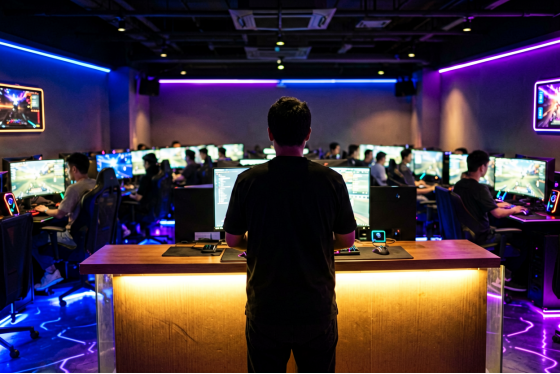
The case for internet cafe remote management software is easiest to see at 7pm on a Saturday, when a 32-seat lounge is full and there is exactly one person behind the counter.
Station 19 puts a hand up. Their hour is done, they want two more, and they'd like it charged against the balance already sitting on their account. The attendant has three ways to deal with that. Walk over. Shout across the room. Or handle it in two clicks without breaking eye contact with the customer currently ordering a drink.
Which of those three is available isn't a staffing decision. It's a software decision.
A venue that answers by walking pays for those steps twice: once in the attendant's time, and once in the customers nobody served while the counter stood empty. On a Saturday night those are the most expensive minutes of the week, and there are usually forty of them.
What "remote" actually means in a cafe
Search for internet cafe remote management software and you land on two different kinds of product wearing the same label.
The first is generic remote access. TeamViewer, AnyDesk, plain RDP. They take over a screen, which is genuinely useful when a station has something visibly broken on it and you'd rather look than walk.
The second kind barely cares about screens. It controls the session: who's logged in, how much time is left, what happens the moment the clock hits zero, whether the machine powers on at all. HandyCafe, SENET, Antamedia and iCafeCloud all live in this second category, which is why none of them describe themselves as remote desktop tools.
The two get filed together because both answer the sentence "I want to do something to that PC without walking to it." That sentence hides the important half. Doing something to a PC is an IT task, and there are maybe three of those in a normal evening. Doing something to a paying session is a business task, and there are sixty.
The distinction decides everything else, because the jobs a busy floor repeats forty times a night are session jobs, not screen jobs.
| Generic remote access | Cafe remote management |
Take over a station's screen | Yes | Yes |
Start and end a paid session | No | Yes |
Lock the station when time runs out | No | Automatic |
Apply a top-up or loyalty discount | No | Automatic |
Share game licences across machines | No | Yes |
Power PCs and consoles on and off | No | Yes |
Produce the day's takings | No | Yes |
One of those columns describes an IT tool. The other describes a business. If you want the market view rather than the mechanism, what venues in the US and Canada tend to run covers the same ground from the buying side.
Front counter of a US gaming lounge during an evening shift
The counter stops being the only place you can work
Here's the part owners underestimate until they've had it for a week: the admin panel isn't tied to the till.
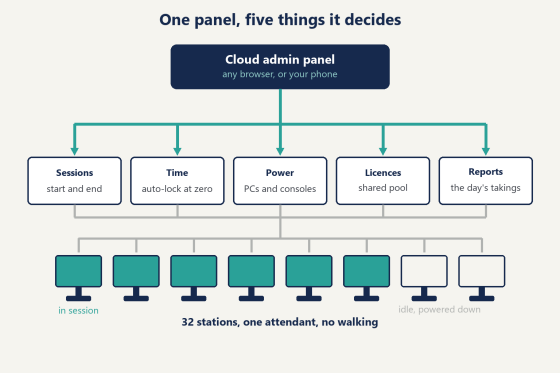
iCafeCloud runs the admin panel in the cloud, so it opens in any browser, including the one on your phone. The practical effect is that "being at the venue" and "being able to run the venue" stop being the same thing. You can be at home on a Tuesday and still see which stations are active, how long each session has left, and what the day has taken so far.
That changes two situations in particular.
The first is the handover. Night shift arrives, day shift leaves, and the numbers either match or they don't. When every session is a record rather than a note on a pad, the handover is a glance instead of a conversation.
The second is the owner who isn't there. Most US venues have someone who owns the place and someone who works the counter, and they are not always the same person, especially on weeknights. Being able to check the floor from a phone without calling the attendant and interrupting whatever they're doing is worth more than it sounds. The company runs support around the clock for 3,000-plus venues across more than 90 countries, which matters mainly at the hours when something goes sideways and your own staff have gone home.
What you're looking at from that phone is short and specific: which stations are running, how much time each one has left, and what the day has taken. Not a wall of graphs. In practice the useful view is the one that tells you within four seconds whether the room is fine, and the answer on a normal night is that it's fine.
The same panel is where the occasional real IT task happens too. A station that's hung gets restarted from the list rather than by somebody crouching under a desk with a power button, and access to a machine can be cut immediately if a customer is doing something they shouldn't. Those are the three-times-a-night jobs, and they're handled from the same place as the sixty-times-a-night ones.
The shift stops being interrupt-driven
Count the walks in one Saturday evening and the benefit stops being abstract.
Thirty-two stations, most of them turning over twice between 6pm and midnight. Every session starts with a walk. Every session ends with a walk. Every "can I get another hour" is a walk, every top-up is a walk, and every machine that needs a restart is a walk plus a wait. Sixty-plus trips across the floor in six hours, each one lasting between forty seconds and four minutes, all of them landing in the busiest window of the week.
Under session control, most of that list stops existing rather than getting faster.
The clock starts when a customer logs in and stops when the session ends, and the charge works itself out (which also ends the small nightly argument about whether the hour started when they sat down or when the game finally loaded). When the time runs out the station locks on its own, which quietly removes the single most awkward interaction in the business: walking up to somebody mid-match to tell them their hour is over. Discounts behave the same way. You set the thresholds once, based on how much a customer has topped up or how many hours they've logged, and the system applies them without anybody deciding anything at the counter.
New customers are the exception, and they should be. Someone walking in for the first time gets an account set up at the counter, which is a conversation you want to have anyway, because it's the only moment in the relationship where you get their details and they get a reason to come back rather than go to the place two blocks away. After that first time they log in themselves and the counter never enters into it again.
What's left for the attendant is the stuff that actually wants a human. Someone new who's never used the place before. A spill. The regular who wants to know whether the Friday tournament is still on.
That's the real shape of the benefit, and it's why "saves time" undersells it. The time was never the problem. The interruptions were.
One cloud admin panel controlling sessions, time, power and licences
Where the money was leaking
Venues that bill by hand rarely lose money in one dramatic way. They lose it in small, forgettable ones.
A customer asks for another thirty minutes and the attendant says sure, meaning to write it down. Somebody's session ended without being charged because there was a queue. Two people share a station for an hour and only one of them gets billed. None of these feel like losses at the time, and all of them show up as the gap between how busy the room looked and what the till says at closing.
Put a number on it and it stops being a rounding error. Three unbilled half-hours a night, at a five-dollar hourly rate, is seven dollars and fifty cents. Six nights a week for a year is around USD 2,300, which is more than the software costs to run the whole room, and three is a conservative count for a busy Saturday. Substitute your own rate and your own honest guess at how often it happens. Arithmetic tends to be uncomfortable.
This is the line item where internet cafe remote management software pays for itself, before any of the convenience arguments get made. Session records close the gap by default, because nothing gets recorded by remembering. At the end of a shift you pull a report covering earnings, expenses and member activity, and the numbers are the numbers.
The report is also the only honest way to answer the questions owners actually argue about. Is Thursday worth staying open until 2am? Did the student discount bring in new members or just discount the ones you already had? Which stations get picked first, and which three does nobody sit at until the room is full? Those are all answerable from a week of clean data and unanswerable from a paper log.
Loyalty runs off the same records. Coin prizes let customers earn coins on in-game performance and trade them for rewards you define, with the tiers set by you and the tracking handled underneath. A regular who's forty coins from something they want has a reason to come back on a slow Tuesday, which is precisely the night that needs one.
What happens to the games?
They come out of a shared pool. When a customer launches a game, the system assigns a licence for that session and returns it to the pool when they're done, so you buy for concurrency instead of buying for every seat.
The difference compounds fast. A 32-seat venue rarely has 32 people playing the same paid title at once, so the number of licences a room genuinely needs is closer to its realistic peak than to its seat count. Buying per machine means paying for the 20 seats that aren't playing it right now.
Handing licences out by hand is the alternative, and it's worse than it sounds. It means an attendant deciding which stations get which titles, remembering to reclaim them, and fielding the question "why can this PC run it and mine can't" during peak hours. The pool answers that question by never letting it come up.
Updates belong in the same conversation, because they arrive on somebody else's schedule and always in the wrong week. A title patches on Thursday afternoon and every machine that's going to run it on Friday night needs the patch (it is always Thursday, and it is always the title everybody wants to play on Friday). Handled centrally, that's one job rather than thirty-two, and the thing that decides whether Friday goes smoothly is whether it got done once at 3pm or was still being done at the counter at 8pm while customers waited.
To be fair, this is the benefit operators tend to discover second rather than first. They buy for the billing, and then a month later realise the reason the weekend stopped being stressful was the games, not the money.
Remote power control, and the bill nobody budgets for
Machines that nobody is sitting at should not be drawing power, and in most venues they do, all day, because turning 32 PCs off individually is nobody's favourite job.
Session-linked power control handles it as a side effect. Stations power up when a session starts and shut down when it finishes, so the floor's electricity draw tracks the floor's actual occupancy instead of its opening hours.
Consoles are the ones people forget. A venue with four PS5s or a couple of Switch stations usually runs them on trust and a kitchen timer, because the cafe software covers PCs and the consoles came later. Putting them through the same billing and time control closes that gap, and it closes it in both directions: the console turns on when the session starts, it turns off when the session ends, and the hour someone played on it appears in the same report as everything else.
In a US venue this lands on two lines of the same bill. There's the direct draw of the machines, and there's the air conditioning that exists largely to remove the heat those machines produce. A row of gaming PCs idling through a slow weekday afternoon is paying for both. (Anyone who's walked into a mid-sized LAN center in July already knows which of the two costs more.)
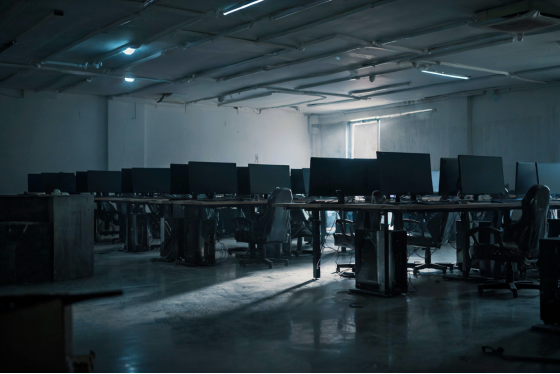
Rows of gaming PCs powered down in a closed LAN center at night
What internet cafe remote management software costs
As of September 2026, iCafeCloud is licensed per PC: USD 2.50 per PC per month, or USD 2.00 if you pay annually, which works out to a 20% discount. The per-PC pricing covers the whole platform rather than splitting features across tiers.
For the 32-seat room in this article, the annual rate is USD 64 a month. That's the comparison worth running: 64 dollars against the value of the hours it removes from your busiest shift, plus whatever the till has been quietly losing to verbal extensions.
Venues running diskless clients usually want both halves of the stack, and the bundle with CCBoot is USD 4.00 per PC monthly or USD 3.20 annually. One handles the money and the sessions, the other handles booting every machine from a single image. They're separate jobs that happen to live in the same room: one decides what a customer is charged, the other decides what the machine boots into in the first place.
Honestly, the monthly-versus-annual question answers itself once the room is past its first season. The annual rate is 20% cheaper and a cafe's seat count doesn't usually move month to month, so the flexibility you're paying the extra fifty cents for is flexibility most venues never use.
Start with ten machines
The trial is licensed from 10 PCs upward and runs 15 days, extendable to 30 if you ask. That's enough to get through two weekends, which is the only test that means anything, since a Tuesday afternoon proves nothing about a system built for Saturday at 8pm.
Two things worth knowing before you click "Get trial licence", both of which cost people an evening otherwise. A trial can only be issued once per machine ID, so decide which box is going to be your actual server before you request it rather than after. And that server needs at least 16GB of RAM and four physical disks, or the request stops at that check. The licence itself comes back through WhatsApp or Telegram once the form goes in.
Decide in advance what you're measuring, too, because two weeks pass quickly and "it seemed better" isn't a finding. Three numbers are enough. Count how many times an attendant leaves the counter on a Saturday evening. Do it once this weekend and once at the end of the trial. Compare the till against the day's report and see whether the gap you assumed existed actually does. And look at what the ten trial stations did versus the ones still running the old way, since running both side by side for a weekend is the one comparison nobody can argue with afterwards.
If you'd rather look before installing anything, you can click through the live demo first, then follow the trial licence walkthrough when you're ready to put internet cafe remote management software on your own machines. Run it on ten stations across one weekend and count how many times anybody had to leave the counter.