

At 9:50 on a Friday night, a 52-seat club in Almaty has eight people standing at the desk. Nobody is leaving. They are waiting for ten o'clock, when the night pack goes on sale and ten hours of play cost less than four hours this afternoon. The phone rings: a CS2 team wants the Bootcamp room from midnight, five seats, and they want to know the price. The admin is alone, there is a notebook open next to the keyboard, and three players in the VIP row are waving because their time just ran out.
This is the moment computer club software either earns its fee or gets in the way. The feature lists all look alike on the vendor pages. What differs is how each product behaves during those ten minutes, and you can test that before you pay for anything.
What a computer club actually sells
Not hours. A club sells a seat in a particular zone at a particular time of day, and the price of that seat moves all week.
Look at any listing site for Almaty and standard seats run from about 500 to 800 tenge an hour, with the better-equipped rooms at 1,000 and up. In Tashkent the range is roughly 12,000 to 25,000 soum. In Kyiv, 60 hryvnia buys an hour in a basic hall and 100 buys a premium seat. Those are daytime numbers. After ten at night the same seat is sold as a package, and on Saturday it's priced differently again.
The games are the same from Kyiv to Astana: CS2 and Dota 2 first, then Valorant, with PUBG and Fortnite behind it. Five-player games, mostly. That matters more than it sounds, because it shapes the room (teams want five seats side by side with a door that closes) and it shapes the calendar, since a patch for either of the big two lands on every machine at once. Astana hosted a PGL CS2 tournament this year, and team practice is a regular reason people book a room on a weeknight.
So the product on the shelf is a grid. Zones down one side, hours of the week along the other, and a different number in most of the cells. A club that runs this from memory and a paper notebook is trusting each admin to carry the grid in their head at 3 am. Good computer club software carries it for them. iCafeCloud, which runs in 3000+ venues across 90+ countries, puts that grid on one screen, and the next two sections go through how it's set up.
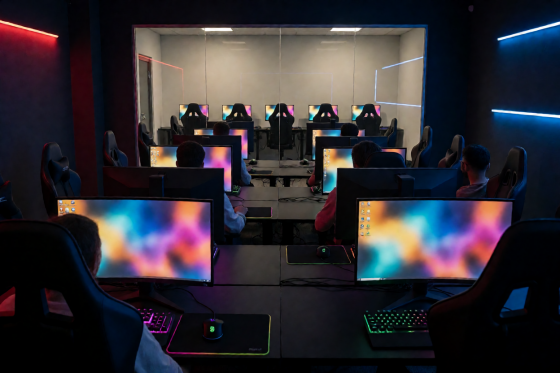
A computer club at night with rows of gaming PCs and a glass-walled team room at the side
Three zones, three prices, one floor
Standard, VIP, Bootcamp. Almost every club in the region uses some version of these three, and the difference between them is hardware and privacy: the main hall, a quieter row with better monitors and chairs, and a closed room for a team.
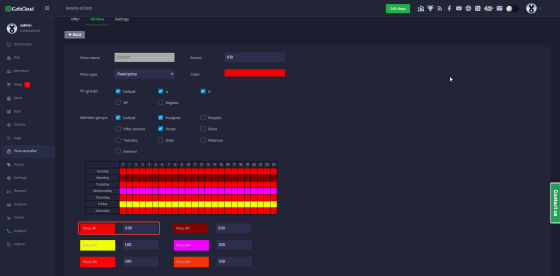
The first job of computer club software is knowing which PC belongs to which zone. In iCafeCloud that's a PC group. You create the groups once, drop each machine into one, and from then on a price is attached to the group and never to the individual computer. Move PC 41 from the hall into the VIP row after a monitor upgrade, change its group, and it bills at the VIP rate.
Prices live under Time and offer, in the PC time tab. Each price has a name, a type, the PC groups it applies to and the member groups it applies to, so a single screen answers the question "what does a Gold member pay in VIP on a Wednesday afternoon?" The screenshot below is that editor: PC groups ticked at the top, member groups under them, and the week laid out underneath as seven rows of twenty-four hourly cells.
The PC time price editor with PC groups, member groups and a weekly grid of hourly prices
Two habits make this cleaner.
Name the groups the way your price board names them. If the board at the door says Bootcamp, the PC group should say Bootcamp, because the admin on their second shift will be matching one against the other.
And price member groups against zones on purpose. The reflex is to give regulars a discount everywhere. A better move for a 52-seat room is to keep the Standard price flat for everyone and give your top member group its discount in VIP only, which pulls your best customers into the seats with the highest margin and frees hall seats for walk-ins at the full rate. It also gives people a reason to climb the member groups.
Consoles fit the same scheme. A PlayStation corner is one more zone with its own rate, and iCafeCloud bills and time-limits console sessions from the same admin panel as the PCs, so the admin isn't running a second timer on a phone for the sofa by the door. In practice that corner is where parents and younger brothers wait, and it earns more than its floor space suggests once it's on the same clock as everything else.
The night pack: 10 pm to 8 am
The night pack is the most local product in the building. One Almaty club with 50 PCs lists its weekday night pack, 22:00 to 08:00, at 2,500 tenge in the Standard hall and 4,000 in VIP and Bootcamp. Kyiv clubs sell the same idea for 250 to 320 hryvnia. Ten hours for the price of four or five, and for a lot of clubs it's what fills the room between midnight and morning.
It also causes most of the arguments at the desk. Nearly all of them are about the edges. A player sits down at 9:40. Does he pay twenty minutes at the hourly rate and then the pack? What about the one who buys the pack at 3 am, or the one whose pack ends at 8:00 while he's mid-match?
Decide the answers once, then put them in the system so that no admin has to decide again.
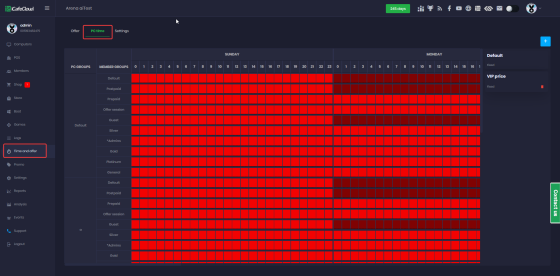
The hourly side of this is the grid from the last section. Each cell is one hour of one weekday, and each price you define gets its own colour. Paint 22 through 7 a different colour from the daytime hours and the hourly rate changes at ten by itself, on every PC in the group, with nobody touching anything. Friday and Saturday get their own row of colours.
The weekly PC time grid showing an hourly price for each PC group and member group
The pack itself is an offer: a fixed block of time at a fixed price, set up under the Offer tab next to PC time. The 9:40 player logs in on his balance, plays twenty minutes at the evening rate, and buys the night offer when it goes on sale. When his time runs out at 8:00 the PC locks, which is the part that saves the morning admin from walking the hall tapping shoulders.
One practical note from the way well-run clubs do this: sell the weekend pack at a different price from the weekday pack, and make them two separate offers with plain names ("Night Mon-Thu", "Night Fri-Sat"). One offer with a rule attached is harder to explain to a new admin than two offers with obvious names.
Who booked the Bootcamp?
A team of five does not walk in hoping. They call or message ahead, and the booking usually ends up in the admin's phone or in the notebook.
Then the shift changes.
Bookings belong in the same system that sells the seats. iCafeCloud takes reservations for single PCs and consoles as well as whole rooms, so the Bootcamp at midnight is a record every admin sees, and the five machines are held for the team that asked. You can click through the booking screens in the live demo without installing anything.
Treat the room as one unit. Book five seats or none, with the same start time, and stop selling those PCs to walk-ins half an hour before the slot. A lone player who "only needs twenty minutes" on Bootcamp PC 3 at 11:45 is how a team ends up standing in the corridor at midnight, and a team that waits once books somewhere else next week.
Shift handover at 8 am
Most clubs here are open around the clock, which means two or three admins a day and a handover at each change. The morning one is the hard one. The night admin has sold forty-odd packs, a fridge's worth of energy drinks and a handful of top-ups, he's tired, and the drawer has to match.
This is where computer club software pays for itself. Cash that goes into a member's balance through the system leaves a record. Cash that goes into the drawer with a promise to "add it later" doesn't. Rule one follows from that: every top-up is entered when the money changes hands, and every drink goes through the POS.
Then the order of operations at 8 am. Pull the report first. It gives you earnings and expenses alongside the member activity, and that is the number the drawer has to agree with. Count the cash second. Clubs that count first and look at the report afterwards tend to find that the two agree suspiciously often.
In Kazakhstan a growing share of that money never touches the drawer at all. Kaspi is how people pay, and iCafeCloud has a Kaspi gateway for QR top-ups: you turn on "Allow Top-up at Client" under Settings, in the QR and SMS section, choose Kaspi as the payment gateway and enter your BIN. From then on a player clicks Top-up on the client PC, types an amount and pays by scanning the QR code with the Kaspi app. Less cash to count. The setup wiki has the full steps and lists the other payment gateways.
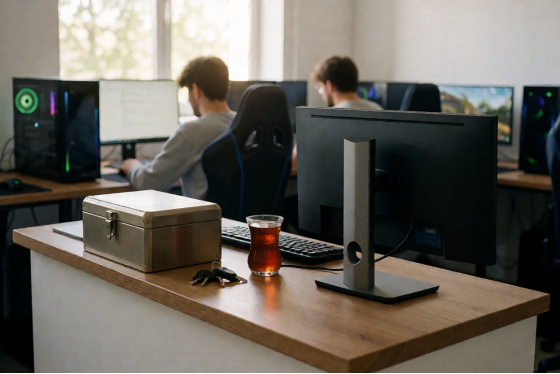
The front desk of a computer club at 8 am with a cash box and a glass of tea
Patch day and the game accounts
When Dota 2 or CS2 ships a big update, every seat in the building needs it before the evening. In a 52-seat club that used to mean an admin walking the rows to start downloads and apologising to whoever sat down at a PC stuck at 61%.
Two things in good computer club software take that job away. Game updates are handled centrally, so the patch goes out to the floor from one place. And game licences sit in a shared pool: when a player launches a paid title, the system hands him a licence from the pool for the session and takes it back when he leaves, so the club owns a sensible number of copies for the titles people play and they circulate across all 52 seats.
Clubs that boot their PCs from a server go one step further. With CCBoot, which is sold alongside iCafeCloud as a bundle, the game lives in one image on the server, you update that image once, and each PC picks it up on its next restart.
That's the whole patch day.
How to test computer club software before you pay
A demo video tells you what the menus look like. A trial on your own floor tells you whether your admins can run a Friday on it. The iCafeCloud trial covers ten PCs or more for 15 days (it can be extended to 30 on request), which is long enough to include two weekends, and you can apply for a trial licence in a few minutes.
Whichever product you try, run the same seven checks. Do them on a real evening, with a real admin.
Check | How to test it | What you want to see |
Zone pricing | Put three PCs in three | Three different rates with |
Hourly switch | Start a session at 9:40 | The rate changes on the |
Night pack | Sell the pack at 10:05 | The PC locks at the end |
Room booking | Book five PCs for | The next admin sees it |
Top-up | Top up one member in | Both show on the |
Handover | Pull the report at the shift | Report and drawer agree |
Patch | Update one game | Every trial PC has it |
If a new admin can get through that table on their third shift without phoning you, the software fits your club. That's the only benchmark I'd trust, honestly, because the owner is never the one using it at 4 am.
Set up the loyalty side during the same two weeks. Discounts that kick in on top-up amount or hours played, and coin prizes for in-game results, take a few minutes to configure and are much easier to judge with real regulars than on paper.
What it costs per seat in tenge, soum and hryvnia
Pricing is per PC. Paid monthly, iCafeCloud is 2.50 USD per PC, and paid annually it's 2.00 USD per PC per month, a 20% saving. The bundle with CCBoot is 4.00 USD monthly or 3.20 on the annual plan. The per-PC price list on the site is the current reference.
At this week's central bank rates, 2.50 USD is about 1,120 tenge, 29,400 soum or 112 hryvnia. Put that next to your own price board. In Almaty, Tashkent and Kyiv alike it comes to roughly two hours of one standard seat, per month. For the 52-seat club from the opening, the monthly plan is 130 USD (around 58,000 tenge) and the annual plan brings it to 104 USD a month.
In Almaty, one weekday night pack per seat covers it twice over.
Support runs 24/7, which matters when your busiest hours are someone else's night, and there is a Russian version of the site for partners and admins who'd rather read it that way. For anything specific to your floor, such as how to map your zones or which payment gateway fits your country, the live chat team will go through it with your actual numbers.
Back to 9:50 on Friday. With the right computer club software the eight people at the desk are a queue that clears in three minutes: the night offer is one click each, the Bootcamp is already held for the team on the phone, and the VIP row tops up from their own screens. The notebook stays shut.