

I have opened two rooms, and the order I would do things in now is not the order I did them in. The first time, I bought the PCs before I had a lease. They sat in boxes in my garage while I found out that the unit I wanted could not power them.
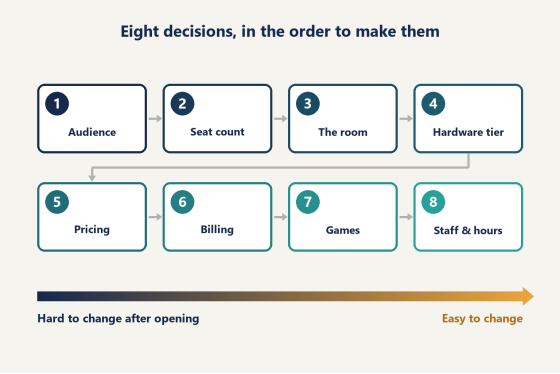
Most advice on how to start an internet cafe is a list of tasks: find a location, get a permit, buy computers, market the place. The tasks are right. The order is the problem. Some of these decisions can be changed in an afternoon once you are open, and some cannot be changed without closing the doors. What follows is eight decisions, arranged so that the ones you cannot undo get made first and with the most care.
Decision 1: who you are opening for
This one comes first because every later answer depends on it.
In the United States, almost nobody opens a room to sell web browsing. People have that at home and in their pocket. What gets built here under the name internet cafe is a gaming cafe, a LAN center or an esports lounge: rows of gaming PCs sold by the hour, sometimes with consoles along one wall. Anyone researching how to start an internet cafe in this country is planning one of those, whatever name ends up on the sign.
So the question is which players the room is for. I think of four groups.
· The after-school crowd. Teenagers who arrive in the afternoon and leave by mid-evening. They are careful with money, and they play Fortnite and Minecraft with friends in the next seat.
· Adult regulars. They come after work and stay late. League of Legends and Counter-Strike 2 are typical. They notice the hardware, and they spend more per visit.
· Groups. Birthday parties, team nights, a company outing. They book ahead, they fill weekend afternoons, and they pay for a block of seats or a room.
· Organized play. School esports teams and local tournaments, which need a set of identical machines for a fixed block of time.
You will end up serving more than one group. The mistake is building for all four on the first day. Pick the one the room is designed around, because that choice sets the opening hours, the hardware tier, the price list and the neighborhood. A room for teenagers wants to be near schools and close early. A room for adult regulars wants parking, a late license to operate if your city requires one, and better machines.
Write the answer down in one sentence. You will refer back to it in every decision below.
Decision 2: how many seats the money covers
Start from the money. Most first-time owners start from the floor area of a unit they like, and then discover what filling it costs.
There is no reliable national figure for what a room costs to open. The estimates published by business-plan sites in 2026 run from about $50,000 for a lean setup to around $250,000 for a 40-station build, and those sources are selling templates, not reporting survey data. The spread comes from three things: seat count, how much work the unit needs, and the lease terms. A single number would mislead you, so I use a split instead.
Divide what you have into three piles.
1. The room. Deposit, build-out, electrical work, furniture, signage.
2. The machines. PCs, monitors, peripherals, a server, the network.
3. Cash for the first months. Rent and payroll, plus utilities, for the period before regulars exist.
The first pile is the one people underestimate. A unit that looks finished still needs cable runs to every desk, extra circuits, desks that survive public use, and often a new floor over the old one. None of it shows in a photo of the finished room, and all of it is paid for before a single seat earns anything.
The third pile is the one that gets raided, usually to add four more seats. Do not do it. My own rule is to keep six months of rent and payroll untouched, and I would rather open with fewer seats than break it.
Empty retail unit with newly assembled desks and boxed monitors before a gaming cafe opens
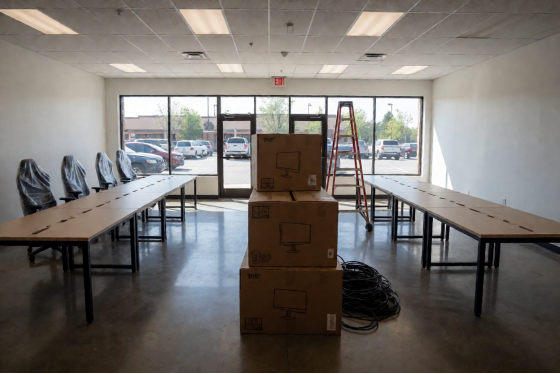
Now the seat count is arithmetic. Get a quote for one complete station at the hardware tier your audience needs: the PC, the monitor, the chair, the desk, the peripherals and a share of the network gear. Divide the second pile by that figure. That is how many seats you can afford, and it is usually a smaller number than the one you had in your head.
One more check before you fix the number. Ask how many seats a single person can run on a slow weekday afternoon, because for most of the week that is who will be in the building. With the right software doing the timekeeping (Decision 6), one person can look after a room of 30. Without it, the same person struggles with half that.
Open with a round, modest number, 20 or 30, and wire the room for more. Adding a row later is easy if the power and the network drops are already on the floor.
Decision 3: the room, and what to ask before you sign
The lease is the least reversible thing you will sign. It runs for years, and the unit's limits become your limits. That is why it comes after the seat count and before any hardware order: you now know the load you are asking a building to carry, and you have not yet bought anything that has to fit.
Three questions decide whether a unit works. Landlords rarely volunteer the answers.
Power
A gaming PC under load, with its monitor, draws several hundred watts. Multiply that by your seat count, then add air conditioning, lighting, a server and a fridge. Many retail units were wired for a shop with a few registers and some lights.
Ask the landlord for the capacity of the electrical panel and the number of circuits serving the unit. Then bring an electrician to the viewing, before you sign anything, and give them your seat count. They will tell you whether the panel can carry it and how many seats can share a circuit. If the answer is a service upgrade, ask the landlord in writing who pays for it and how long the utility takes.
This is the lesson from my garage. The unit I had chosen needed an upgrade that cost real money and added weeks. I found out after I had agreed terms.
Cooling
Every PC in the room is a small heater, and so is every person. The air conditioning in a retail unit is normally sized for shoppers walking through, not for 30 machines running flat out on a July evening.
Ask how large the system is, how old it is and who maintains it. Then ask the question that catches people: does the cooling run at night? In some multi-tenant buildings the central air shuts off after business hours, which are exactly the hours a gaming room is full. Get the answer in the lease.
The internet line
Bandwidth is rarely the constraint in an American city. Availability at one specific address sometimes is.
Check which providers can deliver a business fiber line to the unit, and ask each for the install lead time, which can be several weeks. Find out whether a second provider serves the building, so that you can keep a backup line. A room with no connection has nothing to sell.
A few smaller points belong on the same viewing. Read the lease for restrictions on late hours and on signage. Count the parking spaces. Stand outside after dark and decide whether a parent would be comfortable collecting a fourteen-year-old there.
Look at the shape of the floor as well. The best layout I have used puts the front desk where one person can see the door and every row of screens without standing up. Long, narrow units make that hard. A room with a blind corner needs either a camera or a second member of staff, and the second one is a cost you pay every week.
Then negotiate time. Fitting out a gaming room takes weeks: the electrical work, the network, the furniture, the inspection. Ask for a rent-free period that covers the fit-out, so that the first rent payment falls close to opening day and not two months before it. Landlords with an empty unit agree to this more often than new tenants expect.
Permits come into it here too. Business licensing, occupancy limits and fire inspection differ from one city to the next, so call your city's business office before you sign, not after.
Decision 4: the hardware tier, not the hardware model
By now you know who the room is for and how many seats it holds. That is enough to choose a tier, and a tier is all you should choose at this stage.
The audience sets it. Competitive shooters need high frame rates, which means a strong graphics card and a high-refresh monitor at every seat. A room built around younger players and lighter games can sit one tier down and put the difference into more seats. Decide which you are, and do not mix tiers inside one row.
Identical machines in a row are worth more than they look. One software image covers all of them. A failed part can be swapped from a spare. Tournament organizers will ask for it.
Peripherals are consumables. Mice and headsets wear out in public use far faster than they do at home, and keyboards are not far behind. Put a replacement line in the monthly budget and keep spares on the shelf.
Chairs deserve more of the budget than first-time owners give them. A customer forgives a mid-tier graphics card for three hours. Nobody forgives a bad chair for that long, and the chair is the first thing a regular mentions when he explains why he moved to the room across town.
Storage is the part of the build people overlook. If every PC carries its own drive full of games, every update has to reach every PC. The alternative is a diskless room. With CCBoot, client PCs have no local drive and load Windows and the games from a server. You update one master machine, the rest pick it up on reboot, and each reboot returns the system to a clean state.
I am deliberately not naming models. Graphics cards and network gear turn over every few months, and a list written today would be out of date before you place an order. When you are ready to buy, ask live chat for the current hardware list and build your quote from that.
Decision 5: how you will charge
A price can be changed in an afternoon, which is why it comes after the room and the hardware. You still need a structure on opening day.
The table shows where posted hourly rates at American venues fall. It comes from industry guides and from price lists that venues publish, dated 2025 and 2026. It is a picture of the market, not a survey.
Tier | Posted hourly rate | Where you see it |
Budget | $4–6 | Older hardware, smaller towns, off-peak hours |
Mid | $7–10 | Current mid-range machines, most city rooms |
Premium seats | $12–15 | Top-tier machines, private rooms, stream setups |
Your own floor comes from your costs. Add up a month of rent and payroll, then utilities and software. Divide by the number of hours your seats are occupied in a month, which is far fewer than the hours you are open. The result is what a seat-hour costs you. Your rate has to clear it.
Then build three layers on top of the hourly rate.
The first is the walk-in rate, the number on the wall. The second is packages: a three-hour block, a day pass, a night pass. Packages move people from one hour to three. The third is member balance, where a customer tops up an account and plays against it.
I would put the effort into the third layer first. A topped-up balance is money you already hold. It brings the customer back, because the balance is waiting. It also means every session belongs to a named account, which is what makes the reporting in the next decision useful.
Discounts come last. New owners reach for them in the first slow week, and a room that opens with a discount has trouble removing it. Hold the rate, sell balance, and discount later with a reason.
Group bookings need their own line on the price list. Charge a party by the block of seats or by the room, per hour, and quote it separately from the walk-in rate.
One pattern is worth planning for from the start. Weekday mornings and early afternoons are empty in almost every room, and the seats cost the same to keep whether anyone is in them or not. A lower off-peak rate, or a day pass that is only sold before a set hour, fills some of that time without touching the evening price your regulars already accept.
Diagram ordering eight startup decisions from hardest to easiest to change after opening
Decision 6: what runs the clock
Guides on how to start an internet cafe tend to put software at the end, as something to sort out once the doors are open. I would put it in before the first customer sits down.
The reason is habit. In a room that opens without a system, staff watch the time by eye, friends get free hours, and a regular is told he can settle up tomorrow. None of that is recorded. Three months later you are trying to remove habits that your own opening week created.
Three things have to work on opening day.
Accounts and a clock. Every customer gets an account. Time starts when they log in and stops when the session ends, and the charge is calculated for you. When the time runs out, the machine locks.
One screen for the whole room. From the front desk you should see every machine and every active session, and be able to start a session, end it, restart a PC or cut off access without walking over.
A daily report. Earnings, expenses and member activity for the shift, so that the cash in the drawer can be checked against a number.
iCafeCloud is internet cafe software built around those three jobs. It keeps the member accounts and session records, locks machines when time is up, and gives you the admin panel and the daily report. If you put consoles in the room, it applies the same billing and time control to them as to the PCs.
Two facts are worth weighing for a first room. iCafeCloud is used by more than 3,000 clients in over 90 countries. Support is available around the clock, and a gaming room's busiest hours are the ones when most vendors are closed.
Licensing is per PC, with monthly and annual plans. I will not quote a figure that could be out of date, so check the current per-PC pricing and add it as a line in the second pile from Decision 2.
Set it up while the room is still being built. Enter the price list. Create the staff logins. Then invite ten friends for an evening and run them through real sessions, from account creation to the report at the end of the night. You will find your mistakes with people who forgive you.
Decision 7: how you buy games
The most played titles in a room like this are often free to play. Valorant, League of Legends and Fortnite cost nothing to install, and customers sign in with their own accounts.
Paid games are a different matter. Buying a separate copy for every machine gets expensive quickly. iCafeCloud keeps a shared license pool instead. When a customer starts a session and launches a game, the system assigns them a license for as long as they play. When they finish, the license goes back into the pool for the next player.
So decide which paid titles your audience from Decision 1 will ask for, and start with a short list. You can add to it once the reports show what people play.
Ask your first fifty customers what they wanted to play and could not. That list is better than any chart of popular games, because it comes from the people who already walk through your door.
Decision 8: who is on the floor, and when
Opening hours follow the audience. A room for teenagers earns its money between the end of school and mid-evening. A room for adult regulars earns it from early evening until late. Do not staff hours your audience will not use.
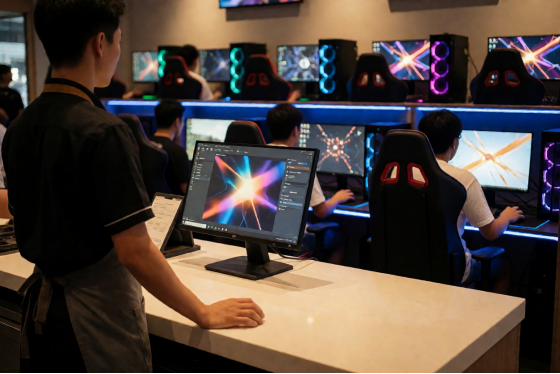
After rent, payroll is the largest recurring cost in an American venue. The realistic plan for a weekday is one person in the building, and that only works if the routine jobs do not need them. The clock, the lock at the end of a session and the calculation of the charge should all happen without staff.
One staff member at the front counter of a gaming cafe with rows of PCs behind
Take discounts out of your staff's hands as well. In iCafeCloud a discount is triggered automatically by how much a customer has topped up or how many hours they have logged, and you set the thresholds. The person at the desk does not decide who gets a better rate. Do not allow verbal discounts at all. They leave no record, and they are the first reason a drawer fails to match its report.
Schedule a second person for weekend afternoons and for any booked event. Groups need someone to greet them, seat them and deal with the one machine that misbehaves while the desk keeps running.
Write the opening and closing routines on a single page before you hire anyone. Opening: power on, check that every seat shows on the admin screen, count the float. Closing: end any open sessions, pull the daily report, match it to the drawer and the card terminal, sign it. A new hire who can follow that page on their second shift is a hire you can leave alone in the building, and that is the whole point of the page.
How to start an internet cafe: questions I get asked
How much does it cost to start an internet cafe?
Published estimates for the United States run from about $50,000 to about $250,000, and they come from business-plan sites, not from industry data. Seat count, build-out and lease terms explain most of the gap. Use the three-pile split in Decision 2, get real quotes for your unit and your hardware tier, and add software at the current price on the vendor's site.
Do I need a license or permit?
Almost certainly a general business license, and often an occupancy and fire inspection. The details depend on the city, so ask your city's business office before you sign a lease.
How many PCs should I open with?
As many as your second pile pays for after six months of fixed costs are set aside, and no more than one person can run on a quiet afternoon. For a first room that is commonly 20 or 30. Wire for more than you open with.
How long before the room pays for itself?
I do not trust any general answer to this, including my own from the first room. It depends on how many seat-hours you sell against how many you have. Track that one ratio every week from the daily reports. If it is climbing through the first three months, the plan is working. If it is flat, change the hours or the audience before you change the price.
What software do I need on opening day?
Billing and session control, before anything else. You need accounts, a clock that locks the machine when time is up, a single admin screen and a daily report. You can test all of it before you open: apply for a trial license, which covers 10 or more PCs for 15 days and can be extended to 30 days on request. The license is sent to you over WhatsApp or Telegram.
That is my short answer on how to start an internet cafe. Make the decisions you cannot undo first, and have the clock running before the doors open.