

Short version: Antamedia grew out of public-access PCs and paid WiFi, and iCafeCloud was built to run a gaming floor. Both can start a session and charge for it. The difference is in everything a gaming center needs after that point.
We get the antamedia internet cafe software vs iCafeCloud question several times a week, mostly from LAN centers that already run the Antamedia server and want to know what changes if they move. This page is the written version of the answer we give on those calls.
Two different starting points
Antamedia has sold software for public internet access since the early 2000s. Its cafe product is a Windows client/server application: the server runs on a main PC and manages the client computers. A newer Antamedia platform, Cafe & Kiosk, now sits next to it.
iCafeCloud started from the gaming side. The venues it was designed around are gaming centers, LAN centers, esports arenas and PC bangs, and the problems they brought were about players: which game is open on which station, who still has hours on the account, how to keep regulars coming back. iCafeCloud's gaming center software now runs in 3000+ venues across 90+ countries.
The starting point decides what the software treats as its main object. In a public-access product, the main object is the computer and the programs it is allowed to open. In iCafeCloud, the main object is the player: an account, a balance, a play history, and a game license that follows that player for the length of the session. Every difference in the sections below comes back to that design choice.
Antamedia internet cafe software vs iCafeCloud, side by side
The Antamedia column summarizes Antamedia's own product page as of May 2026. The iCafeCloud column describes the current product.
| Antamedia Internet Cafe | iCafeCloud |
Designed around | Public-access computers | Gaming centers, LAN |
Main object | The station and its | The player account |
Session billing | Tickets and timed pricing | Member accounts, |
Regulars | Discount pricing | Automatic discount tiers |
Paid games | App management per | Shared license pool, |
Consoles | Counted as clients | Same billing and time |
End of day | Analytics | A daily report of the shift's |
Licensing | A server plus a set | Per client PC, monthly or |
Read the table by the rows that carry your revenue. On a floor where most income comes from regulars playing paid titles, the "Regulars" and "Paid games" rows matter far more than the rest, so those are the two we explain in detail.
Game licenses decide most gaming floors
After the billing system itself, the largest software cost in a gaming center is usually the games. The simple approach is one license per station. On a 30-station floor, that means 30 copies of every paid title, and on most nights the majority of those copies sit unused.
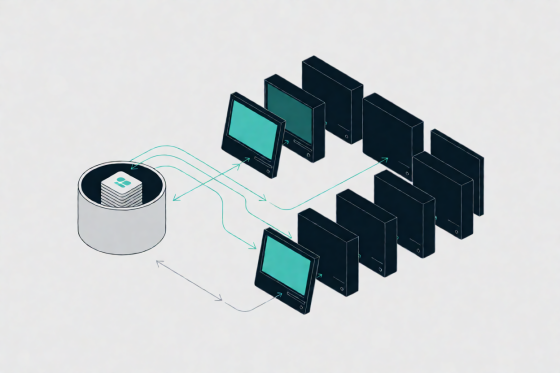
iCafeCloud uses a shared license pool instead. When a player logs in and launches a game, the system assigns one license from the pool for the length of that session. When the player is done, the license returns to the pool and the next player can use it. Nobody at the front desk moves licenses by hand, and nobody has to remember which station holds which copy.
The design reason is simple: no title runs on every station at the same time. For example, take a 30-station floor where Call of Duty rarely runs on more than 10 stations at once. That floor needs a pool sized to the peak of 10, not to the 30 machines. The same logic applies title by title. EA Sports FC might peak at 6 on a Saturday night and sit at 2 on a Tuesday. This means the license budget follows what players actually do on the floor instead of the number of desks. Free-to-play titles such as Valorant and Fortnite stay outside the pool, since the pool is for the paid games where every extra copy costs money.
Diagram of a shared game license pool assigning copies only to stations that are in use
The setup we recommend to new sites:
1. Watch two busy weekends and note the highest number of players on each paid title at the same moment.
2. Size each title's pool to that peak plus one or two copies of buffer.
3. Recount the peaks after the first month and add copies only to the titles that keep hitting their limit.
Game updates sit on the same server. When a title needs a patch, iCafeCloud handles the update, so every station gets the new version without anyone walking the floor with a USB drive. Antamedia's product page describes its side of this as centralized app management, which decides which programs a station may open. On a gaming floor, deciding which player holds a license is the job that moves the budget, and that is the job the pool was built for.
The member account and the discount ladder
Every customer in iCafeCloud has an account. The clock starts at log-in, stops when the session ends, and the charge calculates itself. When a player's time runs out, the station locks automatically. From the admin panel, staff can start or end a session, restart a station, or cut access without leaving the desk, and the dashboard shows every active session on the floor.
The discount system is where the account model pays off. Discounts apply automatically based on how much a customer has topped up or how many hours they have logged. A typical first setup:
· Tier 1 at 20 hours played in a month
· Tier 2 at 50 hours
· A separate top-up tier for players who load a larger balance at once
The venue sets the thresholds, and the system applies the right rate at the next session. Staff never calculate a discount at the counter.
Coin Prizes works alongside the ladder. Players earn coins based on in-game performance, and the venue sets the prizes and the coin cost of each one. The two features reward different players: the discount ladder rewards the regular who spends the most time and money, and Coin Prizes rewards the player who plays well. Running both gives a LAN center two reasons for people to return, and neither one needs a staff member to track it.
Consoles live in the same system. A console station gets the same billing and time control as a PC, so a floor with a console corner does not need a second tool or a paper log for it.
The daily report closes the loop. It covers earnings, expenses and member activity for the shift, and after the first month we ask new sites to compare that member activity with their tier thresholds. If almost nobody reaches Tier 2, the threshold is too high. If almost everybody does, it is too low, and the discount has become the standard price.
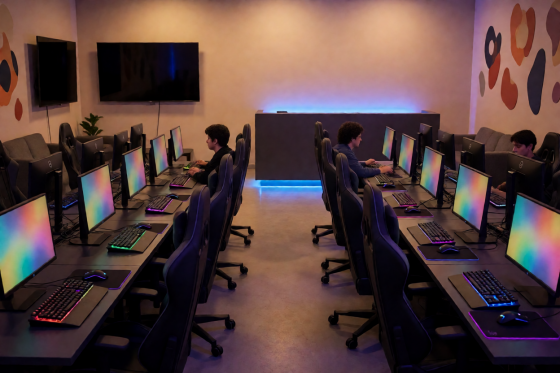
Gaming center floor with PC stations and a console area beside the front desk
How the licenses are counted
Antamedia sells a license that covers a server and a set number of client devices, with more clients added as the floor grows. iCafeCloud is licensed per client PC, billed monthly or annually, so the cost tracks the number of stations in use. To compare it against a quote you already have, see the current per-PC pricing.
Questions we get from Antamedia sites
Can we test iCafeCloud before switching the whole floor?
Yes. A trial license covers 10 to 100 PCs (more in special cases) for 15 days, and it can be extended to 30 days on request. The server needs at least 16 GB of RAM and 4 physical disks. After installing the iCafeCloud server, click "Get trial license" in the Options window, fill in the form, and the license arrives through WhatsApp or Telegram. You can also request a 15-day trial license from the website. Most sites put one section of the floor on the trial first and move the rest once the license pool is sized.
Do consoles bill the same way as PCs?
Yes. Console stations use the same session billing and time control as the PC side.
Our floor is diskless. Does that change anything?
No. iCafeCloud runs the accounts and the game licenses, and CCBoot handles diskless boot. They come from the same vendor, can be bought together as a bundle, and share the same 24/7 support team.
Before you choose: a checklist
Whichever way the antamedia internet cafe software vs iCafeCloud decision goes, these numbers should be on paper before any demo or trial:
· Peak concurrent players for each paid title, taken from two busy weekends
· The paid titles that belong in a shared license pool
· The discount tiers you want for regulars, in hours or top-up amounts
· Prizes you would offer for in-game performance
· The number of console stations next to the PCs
· Who reads the daily report, and which three figures they check first
· A plan for which section of the floor goes on the trial first
With that list ready, walk through the online demo and match each line to the screen that handles it.