

An internet cafe software comparison is useful only when the products are being judged on the same jobs. A search for "internet cafe software comparison 2026" usually means the operator needs to choose between systems, not collect another list of feature names. A feature list can tell you that a system has billing, member accounts or console control. It does not show what happens from the moment a customer starts a session to the moment that sale appears in a shift report.
For a US gaming center, LAN center or esports lounge, compare the work the software has to carry through a normal day. Use the same test transactions in every trial. Record what you can see and verify, then decide which system fits the way your venue serves players. iCafeCloud is one system an operator can include in that shortlist.
Internet cafe software comparison 2026: compare jobs, not checkboxes
Begin with the work your front desk and floor repeat every day. A short list might include starting a walk-in session, applying a member rate, lending a paid game license, timing a console, and closing a shift. Those jobs touch several parts of a management platform. A box beside “billing” does not tell you whether the rate, member, machine and payment record stay connected.
Write one simple test for each job. Use an ordinary guest, a member with a balance, a title that draws from a shared license pool, and a console if the venue has one. Each candidate should receive the same inputs. If you change the test from one demo to another, the comparison is no longer useful.
Keep a record of the action and the evidence it produces. Did the timer start when expected? Did the right rate apply? Could the cashier find the transaction afterward? This is a working note, not a scorecard. You do not need to assign points to every screen. You need enough detail to explain why one system fits the operation better than another.
Venue task | Run the same test in | Evidence to record |
Walk-in PC session | Start a session, add time, | Applied rate, remaining |
Member visit | Use a balance or | Balance change, price |
Paid game | Launch a title using a | License assignment, |
Console visit | Start and end a timed | Seat status, session |
Shift close | Review the same time | Income totals, member |
Follow one PC session from login to checkout
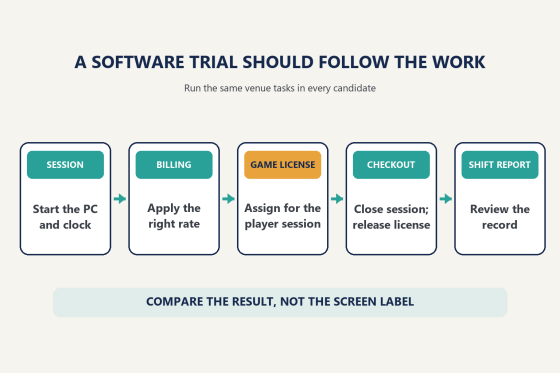
Start with the transaction every venue understands: a guest sits down, chooses a PC, uses it for a set period and pays. In each system, check how the operator selects the station, starts the clock, changes the session and completes checkout. Then look for the saved record. A clean demo should let the person at the counter answer three questions without guessing: who used the station, how long the session ran and what amount was charged.
Test a few ordinary variations. Start a prepaid session, add time, and then end it early. If the software supports postpaid sessions, run one of those too. Check how a machine appears when a session is active, when time is nearly up and after checkout. The exact labels differ by product, so compare the results rather than expecting every screen to look alike.
Rates at US gaming venues vary by operator and offer. For example, Respawn Lounge lists PC play at USD 4 per hour, while Tech Port Esports lists a USD 5 entry fee that includes the first hour, followed by its standard hourly rate. These are individual venue examples, not a national average. They show why a trial should use the venue’s own rate card instead of a vendor’s sample configuration.
During the test, enter your actual weekday and peak-period rates. If your venue uses a member discount or a package, note when the system applies it and what the cashier must do. A software comparison should expose the steps the staff will repeat, not just the final total on a demo screen.
Workflow used in an internet cafe software comparison, from session start to shift report
Use member accounts to test repeat business
A member account changes what the cashier needs to know. The system may need to look up a balance, identify a member group, apply an offer or record a top-up. Test these in a sequence, not as isolated features. Create or select a test member, add a balance, start a session and close it. Then check whether the member history and the venue’s session record tell the same story.
Use a clear rule that could plausibly apply to your own operation. For example, set a member group to a different rate from a walk-in, or configure a top-up threshold for a discount. Make the rule explicit in your comparison notes. Then run the same account through each product and see whether the resulting price is predictable to the cashier and visible in the record.
iCafeCloud supports member accounts and balances, session billing, member groups and automatic discounts based on venue rules. The test is whether those functions fit the way your staff handles regulars. Can a cashier tell which price applied? Can a manager check the member’s activity after the shift? Can the venue change a promotion without asking staff to remember a manual adjustment?
Do not make the review depend on how attractive a loyalty screen looks. Track the action and result: balance before, session charge, balance after, and any promotion applied. A system that presents those pieces clearly gives an owner a more useful basis for reviewing repeat visits and offers.
Check how a paid game license moves through a session
Game access is a separate comparison from PC time. A venue may have many stations but only need a smaller pool of accounts for a title if fewer customers play it at once. That makes it important to observe when a license is assigned, how the operator can tell that it is in use, and what happens when the player closes the game or ends the session.
Use a title your venue is entitled to run, and follow it through a complete session. First, record whether the customer chooses a venue account or their own account. Next, launch the game and check which license becomes active. End the session and look for evidence that the license returned to availability. If the pool is full, note how the system reports that condition and where the event can be reviewed later.
Run the test again with more than one station. Have a second test player request the same title while the first license is in use. The point is to see whether the software makes availability clear at the moment a customer tries to play. Then close the first session and check whether the available count changes. A vendor should be able to show where those actions appear in the client and operator view, and what a staff member can review after the rush.
Keep the game-account setup consistent across trials. Use the same venue-owned account and the same launcher where the vendor supports that workflow. Write down any setup step that changes what the test proves. A successful launch alone does not confirm that the license was tracked, released and recorded for the next shift. Those are separate observations.
This is where a feature label such as “game management” can mean different things. A library may show what is installed. An update tool may help keep files current. A license pool assigns an account for a player’s session. Those jobs are related. Ask the vendor to demonstrate the job you need and record it separately from the others.
iCafeCloud’s shared license pool assigns a venue-owned license when a player launches a supported paid title and returns it to the pool after use. The pool and its logs can help an operator see assignments and shortages. When you compare systems, record the title, the number of simultaneous launches in your test, the assignment result and the release event. Do not estimate a pool from the number of installed PCs alone; use observed concurrent demand and the relevant game-account terms.
Add those observations to your internet cafe software comparison 2026 notes. A license visible in a feature list is not the same evidence as a test that shows when the account is assigned and released.
Game demand also changes. Steam’s Most Played chart is a live global snapshot, not a survey of US gaming centers. On October 18, 2026, Counter-Strike 2, Dota 2 and PUBG: BATTLEGROUNDS appeared among its leading games. Use charts like this to choose titles to check, then substitute the games your own customers request. A venue’s launchers and account rules should guide the final test list.
Add consoles, staff handoffs and shift reporting
PCs are not the whole floor at every US gaming venue. Gaming Cafe Map’s US directory lists venues with consoles, tournaments, food and private rooms among their amenities. It is a directory rather than a census, but it points to a practical question: can the software account for the different ways your customers use the space?
If you offer console time, test one console session with the same care as a PC session. Start it, add time if that is part of your service, end it, and check the charge. iCafeCloud supports PC and console control under the same billing and time-management approach. Use the demo to confirm how a console seat appears in the operator workflow and where its session appears in records.
Then test a shift handoff. Have one test operator begin an activity and another review the closeout. The manager should be able to find the transactions, member activity and machine use that matter to the venue. iCafeCloud’s daily reports include earnings, expenses and member activity. When comparing reporting, check that the date range and categories match the question you are trying to answer. A larger report is not automatically a more useful one.
The operating setup matters too. Ask each vendor which parts of the workflow need an internet connection and which are handled on the venue’s own network. Avoid assuming the answer from the word “cloud” or “local.” During the trial, have the vendor explain the documented behavior and, where appropriate, test the scenario with support. Record the result rather than relying on a sales phrase.
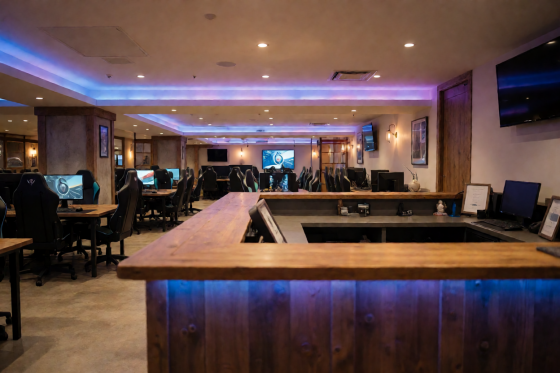
Gaming center front desk with PC stations and a console area
Record what each trial proves
Before a demo or trial, prepare the same test accounts, rates and game titles for each candidate. Keep the test short but representative. A single-room center and a multi-location operator have different priorities, so put the most important tasks first.
For each run, record who tested the system, what they did and what happened. Save screenshots only from real software sessions if you have permission. Ask vendors for current documentation if the demo cannot show a result. Verify the game-account terms for any title you plan to offer.
Treat “internet cafe software comparison 2026” as a request for workflow evidence. Your notes should include a session record, a member balance change and a license event, plus the console charge and shift report if those apply to your venue. iCafeCloud’s feature overview covers billing, membership, license pools and PC and console functions. Check current per-PC pricing, then review trial instructions. Use the same test plan with every candidate.