

A startup budget lists what an internet cafe will buy; a business plan explains who will pay to use it. A room full of PCs establishes capacity. Customer research, pricing assumptions and a repeatable operating process explain how that capacity becomes a business.
An internet cafe business plan needs enough detail to check the numbers and assign the work. Keep the evidence beside each assumption. A proposed hourly rate needs a local comparison. A revenue forecast needs paid hours. A staffing budget needs a shift schedule that covers the advertised opening hours.
Set up your internet cafe business plan
Create an editable document with sections for the company and its customers, market research, services, management, marketing, financial forecasts, startup funding and operations. Add an executive summary at the front and review dates at the back. Keep supplier quotes in an appendix with the research notes and calculations. The SBA's business planning guidance provides a useful reference for the structure.
Draft the summary last. Start with the facts needed to calculate demand and costs, even if the finished document presents them in a different order.
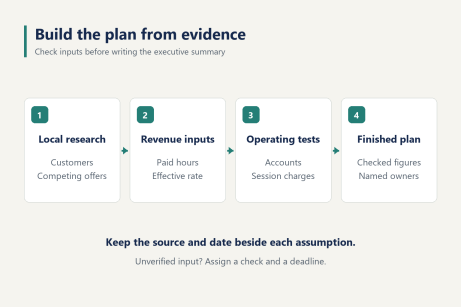
Give the working document a preparation date and a named person responsible for updates. Mark each financial input as a supplier quote, an observation or an assumption. For an assumption, add who will check it and when. Leave unknown amounts visibly blank rather than entering zero, which can make an unfinished forecast appear profitable.
Describe the customers and the reason to visit
Write a company description that identifies the location being considered, the main customer group and the service being sold. State the proposed business structure and ownership. Confirm local registration and permit requirements, along with tax arrangements, with the relevant authorities and professional advisers before committing to a site.
For the customer description, fill in this sentence with evidence from the proposed area:
"The venue will serve [customer group] within [local area], primarily during [time periods], with [service] that addresses [specific reason to visit]."
Be precise about that last field. Playing alongside friends, accessing a suitable gaming setup and booking space for a group imply different room layouts and sales processes. A general claim that people enjoy games does little to establish demand for a particular address.
In the US, gaming lounge and LAN center may describe the intended venue more clearly than internet cafes alone. Brooklyn's Sky Gaming Lounge, for example, advertises PC and PlayStation gaming alongside snacks and drinks. That is one service combination, not evidence that every location should offer the same mix.
Record the customer's likely visit length, travel method and preferred time of day. Separate what was observed from what still needs testing. If the main audience arrives after school, a forecast built on steady morning demand needs another identifiable customer group.
List the proposed opening hours beside those customer periods. This exposes gaps before they become payroll commitments. The customer description is ready when another person can explain who is expected to visit, why that person would choose this venue, and which hours the forecast depends on.
Record local demand and competing offers
Keep a short evidence log rather than filling the market section with national gaming statistics. Local research should answer questions about the proposed catchment area, competing services and the prices customers can compare.
Research item | Record in the plan | Use in the forecast |
Nearby venues | Address, service mix, published | Compare equivalent offers |
Customer conversations | Audience and dated notes of | Identify visit reasons and |
Visits to the area | Observation period, access, foot | Test location and scheduling |
Group enquiries | Requested date and group size, | Separate interest from |
Compare like with like. A prepaid package, a premium PC hour and a console booking are different offers. Record the conditions, not just the headline price.
Repeat observations across relevant periods. A full room during a special event cannot establish an ordinary weekday occupancy rate. An empty venue before its main customer period is equally weak evidence of failure.
Put unresolved questions at the end of the section. For example, identify whether enough customers want weekday daytime access to justify opening then. Assign someone to investigate that question before treating those hours as a source of revenue in the internet cafe business plan.
Save the evidence where it can be checked later. A price comparison should identify the page or dated menu used. Interview notes should show the question, since asking whether someone likes gaming produces a different answer from asking what would make them pay for a local session. Record responses that challenge the proposed offer as well as those that support it.
Specify the services and how each one earns revenue
Describe each proposed service in terms of what is sold, how it is charged and which resources it occupies. PC access is usually measured in time. A private event may reserve several stations and require staff preparation. Food sales need their own purchasing and service process.
For each service, write the price basis, expected quantity sold and evidence supporting that quantity. Keep optional services out of the opening forecast until the required space and staffing have been included in the budget.
Separate a membership fee from prepaid gaming credit. Explain what the customer receives and how usage is recorded. With iCafeCloud, member accounts and session billing give those rules a practical place in the daily workflow. Discounts can be based on top-up amounts or accumulated playing time.
Document the intended discount rule before calculating the effective hourly income. A package with bonus time produces a different amount per hour used than the displayed walk-in rate.
Check capacity across services. If a party reserves the PC area for an afternoon, remove those same stations and hours from the walk-in forecast. Include setup time if the room cannot be sold during preparation. Count the booking once, then account for any separately charged extras.
Assign management roles and the marketing work
Name the person responsible for opening, customer accounts, payments, technical maintenance and closing. The owner may hold several roles, but each task still needs coverage. Add relief arrangements for breaks and absence. Specify extra coverage for busy periods where needed.
Build the wage input from that schedule. Include preparation and closing work outside customer opening hours. If the owner is covering unpaid shifts during launch, state the arrangement and budget for the later staffing plan rather than assuming free labour indefinitely.
The marketing section needs actions that someone can carry out. For a local search listing, assign responsibility for publishing accurate opening hours and service information. For community partnerships, identify which groups will be contacted and what offer they will receive. For paid advertising, specify the spending input and how resulting purchases will be tracked.
Measure purchases and return visits alongside enquiries. A campaign can generate attention without generating enough paid sessions to cover its cost.
Record a review date for each launch activity. Compare the campaign cost with the contribution from the business it brings in, allowing for discounts and delivery costs. Do not count a prepaid balance as both a new cash sale and a second full sale when the customer later spends it.
Build the revenue forecast from paid PC-hours
Start with capacity, then apply demand. Calculate each month separately, using the actual number of trading days planned for that month.
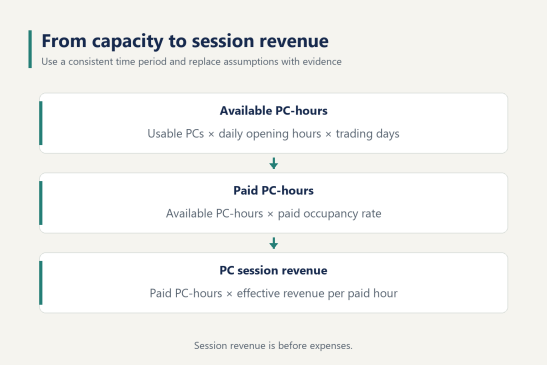
Available PC-hours = usable PCs × opening hours per day × trading days.
Paid PC-hours = available PC-hours × paid occupancy rate.
PC session revenue = paid PC-hours × effective revenue per paid PC-hour.
Paid occupancy measures the share of available time sold for paid use. Separate complimentary sessions from paid time and remove unavailable capacity consistently. A machine awaiting repair cannot supply the same hours as a working station.
A worked example with stated assumptions
Use these figures only to follow the calculation. They are hypothetical inputs, not US averages or a forecast for a real venue.
Assume 30 usable PCs, 12 opening hours per day and 30 trading days. Available capacity is 10,800 PC-hours. At an assumed 25% paid occupancy, 2,700 PC-hours are sold. At an assumed effective rate of $6 per paid hour, PC session revenue is $16,200 for that month, before expenses.
Change only occupancy to 15% and the calculation becomes 1,620 paid hours and $9,720 in session revenue. At 35%, it becomes 3,780 hours and $22,680. The spread shows why the demand assumption needs evidence. It does not establish which result is likely.
Replace every example input before using the forecast to make a commitment.
Check what the hourly figure includes
Use the amount attributable to gaming time consumed after applicable discounts, rather than applying the highest advertised rate to every session. When packages include bonus hours, keep the time basis consistent. Track promotional time separately so the same concession is not deducted twice.
Break the model into weekday daytime, weekday evening and weekend periods if the research indicates different demand. Apply each occupancy assumption to its own available hours, then add the results. Do not average occupancy percentages without weighting them by capacity.
Model console bookings separately from events. Give food sales their own line. For an event package, allocate the package income once. Record food purchasing and event delivery costs when calculating contribution. A large sales total can still leave little money for rent and wages.
For a simple operating break-even check, subtract each service's directly attributable costs from its sales to estimate contribution. Compare total contribution with recurring fixed operating costs. If using required PC-hours as the result, first subtract contribution from other services from fixed costs, then divide the remainder by contribution per paid PC-hour. Keep the cost classifications consistent.
This is an operating check. The cash schedule must also account for equipment purchases and financing payments when due. Add the actual software quote to the cost model before calculating totals. An internet cafe business plan with missing costs has no reliable break-even result.
List startup spending and the funding required
Build the spending schedule from dated local quotes. In the funding section of the internet cafe business plan, separate money needed to open from recurring expenses and the cash retained to support trading.
Category | Inputs to collect | Timing to record |
Premises | Deposit, agreed fit-out work and professional checks | Deposit and contractor payment dates |
Equipment | PCs, displays, furniture, network equipment and spares | Purchase and delivery payments |
Software | Insert the current supplier quote for the selected PC count | Billing dates and renewal period |
Monthly operations | Rent and staffing, plus connectivity costs, utilities and insurance cover | Due dates and seasonal changes |
Opening cash reserve | Cash required while receipts build up | Lowest projected cash balance and reserve target |
For the software line, use iCafeCloud's current per-PC licensing options and enter the chosen terms in the working budget. Keep monthly and annual payment timing consistent with the cash forecast.
List owner funds and proposed external funding separately, including when each amount becomes available. Match funding to payments as they fall due. Funds expected after equipment delivery cannot cover an earlier supplier deposit. Keep replacement allowances visible instead of spending the entire available balance on opening equipment.
For each supplier quote, note whether delivery and applicable taxes are included. Record the quantity quoted and how long the offer remains valid. If the opening date moves, refresh expired quotes before updating the funding request. A lower equipment subtotal is not a saving if installation work was simply omitted from it.
Write the operating plan as a customer workflow
The operating section should explain how a visit becomes a recorded session and a recorded charge. Use iCafeCloud cafe management software to connect the plan's member and billing rules with the work performed at the counter.
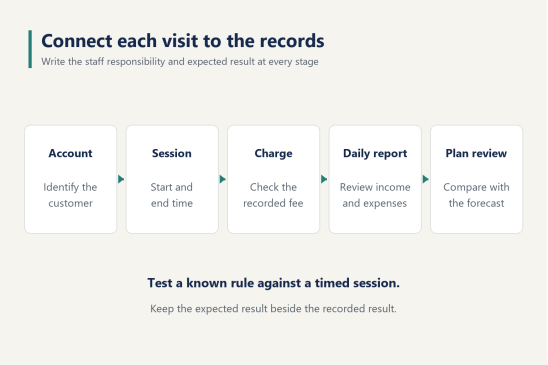
Write the workflow in order:
1. Create or identify the customer account. Confirm which pricing or member arrangement applies.
2. Record the payment or available balance under the venue's chosen rules. Explain the package to the customer before the session begins.
3. Start the session. Check that the customer is using the intended station and the correct charging arrangement.
4. End the session and check the recorded time and charge. Explain how staff handle an agreed adjustment and who approves it.
5. Complete the shift review. Compare payment records with the day's earnings and expenses, then record any item requiring follow-up.
Name a responsible role beside each stage in the working document. Include the handover between staff, since that is where a customer enquiry or an approved adjustment can lose its context.
Test the rules before opening
Request an iCafeCloud trial to test the account and session process against the written plan. Use the session and billing setup documentation when configuring the workflow.
Prepare a timed test session with a known charging rule. Check the session start, elapsed time and final charge. Test the selected member discount separately so the expected result can be calculated before reading the recorded result.
Then check the end condition. iCafeCloud automatically locks the machine when the customer's time runs out. Confirm the staff member can explain what happens next under the venue's renewal process. The admin panel also supports starting and ending sessions and restarting machines, so identify who is responsible for those actions during a shift.
Include consoles if they form part of the service plan. Write down the game's licensing arrangements and who will confirm commercial-use terms with the appropriate provider. Keep the game list tied to customer demand and the permissions obtained for the venue.
Finally, use iCafeCloud's daily reports to review earnings and expenses alongside member activity. Record corrections with enough context for the next person to investigate. If a test result differs from the written expectation, first check the selected charging rule, the applicable discount and the session duration. Repeat the test after correcting the setup or the written assumption.
Test cash flow and set the first review dates
Prepare a month-by-month cash schedule covering the launch and early trading period. Start with opening cash, add receipts and funding, then deduct payments when they are due. Carry the closing balance into the next month.
Cash and profit follow different schedules. Buying equipment uses cash before the equipment has served customers. A loan receipt increases available cash without being trading revenue. Customer prepayments bring cash forward while leaving service still to be delivered. Ask the person preparing the accounts to confirm tax treatment and depreciation, as well as how financing is recorded.
Run a conservative case with slower customer growth and retain the same committed bills. Recalculate the lowest balance. Also test a delayed opening while checking which payments still fall due. These tests show when more funding or a different spending schedule is needed.
Set the first weekly operating review and monthly financial review before opening. Assign the owner of each review and the records required. Compare actual session income and operating costs with the assumptions, investigate differences, then date the revised forecast.
Keep the original forecast alongside the update. Otherwise, changing an assumption can erase the evidence of what the business learned.
Write the executive summary after the evidence is in
Write the summary from the completed sections. State the proposed venue, primary customers, services, management responsibility and funding required. Explain the main evidence supporting demand and the next milestone. Use the same figures as the financial model.
Remove claims that cannot be traced to the research or calculations. A reader should be able to move from a summary statement to the supporting quote, observation or forecast input without asking what the number represents.
The internet cafe business plan is ready to guide the next commitment when local demand evidence supports the sales assumptions, dated quotes support the spending schedule, and the conservative cash case shows how bills will be paid. Where one of those checks remains incomplete, give it a named owner and a deadline before advancing the related spending decision.